timer & cycles
updated
A dot-matrix countdown you set in one gesture: drag the digits, type the time like on a microwave, or pick a preset. Work-rest cycles (25/5 Pomodoro, 52/17, 90/15 – or your own), a stopwatch, a stash that keeps a running timer while you try another one, and a finish alert that can also pause your media. When the countdown ends it plays a single sound and the digits pulse until you reset it.
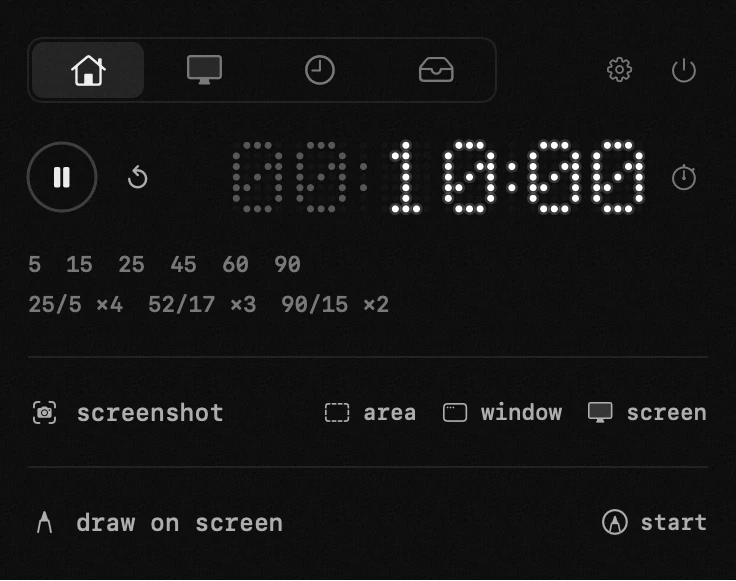
- presets – 5 and 15 are breaks, 25 a pomodoro, 45 an academic hour, 60 an hour, 90 a deep-work cycle. your own presets live in settings.
- dragging – pull the digits with the mouse: over hours it changes hours, over minutes minutes, over seconds seconds.
- typing – click a digit group (hours, minutes or seconds), it lights up yellow, then type: digits slide in from the right.
- restore – a preset tapped mid-countdown saves the running timer; the button brings it back and resumes.
- alert – sound, banner or silent: picked in timer settings.
- stopwatch – the icon to the right of the presets switches to counting up from zero: start, pause and reset work the same, and the count also shows in the menu bar.
- sharing the menu bar – when a task is being tracked at the same time, the two clocks take turns on the bar's one line: each holds it for five seconds and hands over with a fade, and a small glyph in front of the digits says whose time it is. a clock stopped from the panel keeps its place instead of leaving a gap.
- start and pause buttons – the big circles: play starts or resumes (after the finale – restarts), pause holds the countdown, stop resets to the set time.
- ±5 – the «min» capsules add or take five minutes, mid-run too.
- done – the signal fires once; the digits keep blinking as a reminder it rang, right up until you reset. clicking the digits returns the timer to its set time.
app permissions
notifications — the timer's alert and a finished torrent.
settings
- timer countdown in menu bar
- finish alert
- pause media when done
- timer sizecompact · large
- timer formatdots · digits · labeled
- digit sizelarge · small