VPN
updated
Every VPN your Mac knows about, with a switch each – whatever the brand. Hop reads the list straight from system settings, so a client you installed yesterday appears on its own and one you removed disappears; there is nothing to add or configure here, and no per-vendor support to wait for.
Switch a tunnel on and off without opening anything. While one is up, a small dot sits in the corner of the menu bar icon, next to the app's other indicators, so you can see it with the panel closed. It is green while traffic is going through the tunnel and turns orange when the tunnel is on but nothing is coming back through it, so a connection that quietly died stops looking like a working one – and the panel marks the row it means. Click a name and that VPN's own window opens for the times you need it – to pick a country or change a setting – and Hop quits the app again once you close the window, so it never sits in the Dock and the menu bar for a switch you touch twice a week. The connection stays up: the tunnel is held by the system, not by the app.
The row shows what the client itself reports – its name, and in brackets what the configuration adds, usually the country. Hop never guesses the country from the server's address: the address registry says where a range is registered, not where the machine stands, and a wrong country stated confidently is worse than none.
The dot can be switched off in settings – the module and its switches go on working without it.
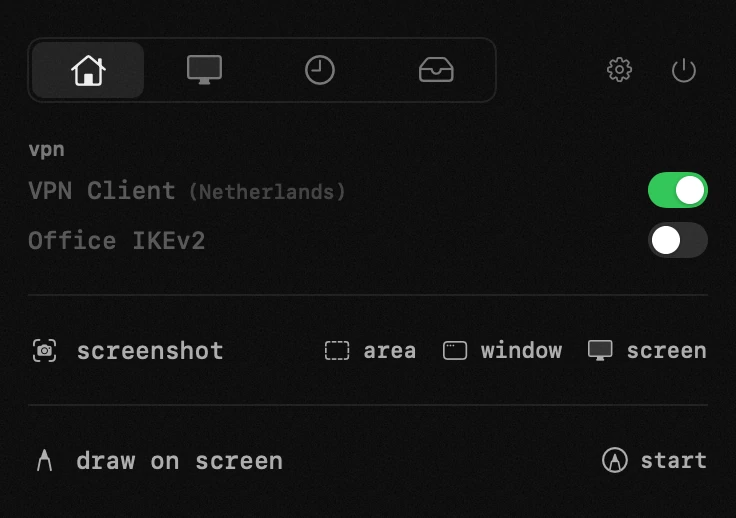
- switch – flips the connection straight from the panel. the light is green while the tunnel is up and dims while it is coming up or going down. it turns orange when the tunnel is up but nothing is coming back through it.
- the name is a button – it brings up that vpn's own window when you need it (pick a country, change a setting), and hop quits the app again once you close the window. the connection stays: the tunnel is held by the system, not by the app. so the client never sits in the dock or the menu bar for a switch you touch twice a week.
- the dot – with the panel closed the menu bar says the same thing: green while a tunnel is up, orange while one is carrying nothing. it can be switched off in settings; the list and its switches go on working.
settings
- visible rows
- vpn status in the menu bar icon
- keep it off until i switch it on
- off takes the vpn out of the network set, so nothing can start it again – neither its own on-demand rules nor the vendor's helper. switching it back on, or opening the vendor's window, puts it back. turn this off to only stop the tunnel.