vpn switcher for Mac
updated · by Anton Shakirov
hop is not a vpn and does not sell one. it lists the connections your Mac already knows about — whatever the brand — and gives each of them a switch, so turning one on stops meaning opening an app you touch twice a week.
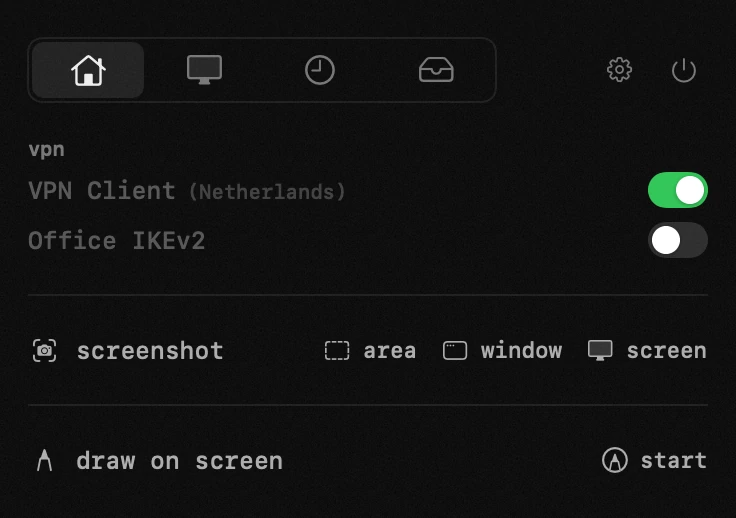
| what it is | vpn switcher inside hop, a menu bar app for macOS |
|---|---|
| price | free — no trial, no pro tier, no account |
| licence | MIT, source on GitHub |
| requires | macOS 14 or later, Apple silicon or Intel |
| works offline | yes |
| data sent anywhere | none |
what a vpn switcher is, and what hop is not
hop is not a vpn. it has no servers, sells no subscription, routes no traffic and cannot make you anonymous. if you are looking for a vpn service, this is not one and no part of the app will become one.
what it does is switch connections your Mac already knows about. the tunnel is held by macOS, exactly as it would be if you had used System Settings.
where the list comes from
the list comes straight from System Settings: one you configured yourself, one a client installed, one from a service you pay for. if macOS knows about it, it appears here with a switch, and one you remove disappears on its own — nothing to add, and no waiting for support for your particular provider.
nothing about your traffic passes through hop. that is not a promise about our servers, because there are none.
if you arrived because a tunnel says connected and nothing loads, that has its own page with the free fixes in order: fix a vpn with no internet
the free route: the macOS vpn menu and scutil
before anything about hop: macOS can already do most of this, it costs nothing, and pretending otherwise would last as long as it takes you to open System Settings. there are two free ways, and both are useful whichever you end up using.
what the built-in vpn menu gives you
macOS has a vpn status menu of its own. once it is showing, you get a menu bar item that connects, disconnects and moves between the services the system holds — no third app involved.
Apple describes it in one line, and the line is the whole feature: connect to a vpn on Mac
so if you have one configuration and you want it on a menu, stop here: turn that menu on and you are done. what it does not do is tell you anything about the tunnel beyond «connected», and it covers the services the system manages — a client that ships its own menu bar item still ships its own, and you end up reading two icons instead of one.
switching a vpn from the command line
the second free way is scutil, and it deserves more attention than it gets. scutil --nc list prints every connection in the current set — on the Mac this page was checked on it printed five, including two clients installed as network extensions and an old modem entry nobody had cleaned up. each row carries the name you pass to the next command: scutil --nc start "name" raises it, scutil --nc stop "name" drops it. no sudo, about five seconds. put that in a shortcut and you have a working switcher for free.
the cost is the usual one: knowing the command exists, and knowing the exact name of the service — including whatever the client called it, in whatever language it called it.
the same command is the free answer to a tunnel that dies every time the Mac sleeps, including how to make the reconnect happen without you: reconnect a vpn that drops after sleep
so which one do you need
one configuration, switched twice a day: the built-in menu, and nothing else. the simple case ends where a second client arrives, or where the question stops being «is it on» and becomes «is anything going through it» — neither free route answers the second one.
| what you have | the free route | with hop |
|---|---|---|
| one vpn configuration macOS holds itself | turn on the built-in vpn menu — two clicks, nothing installed | not needed, keep the menu |
| four configurations from three different clients | each client brings its own menu bar item, or you learn each name for scutil | one list, one switch each, whatever the brand |
| you want to see a tunnel is up without opening anything | the built-in menu covers what the system holds, each client covers itself | one dot on one icon, for all of them at once |
| you want to know traffic is actually moving | two scutil --nc statistics runs with a pause — and you have to suspect it first | the dot turns orange on its own, while you are reading something else |
| the client sits in the Dock for a switch you touch twice a week | quit it and lose its menu bar item with it | click the name when you need its window, close it and hop quits the app |
how to switch a vpn from the menu bar
every connection the Mac knows about is in one list with a switch beside it, whoever set it up, and a dot on the menu bar icon says whether a tunnel is standing. no vendor window to open, no trip through System Settings, and no wondering half an hour later whether the thing is still on.
what the colours of the dot mean, including the tunnel that is up while nothing goes through it — the handbook end of this, in your own language: the vpn switch in the guide
the row shows what the client itself reports: its name, and in brackets whatever the configuration adds, usually the country. hop never guesses the country from the server's address — the address registry says where a range is registered, not where the machine stands, and a wrong country stated confidently is worse than none.
why a dot on a menu bar icon ends up being the whole interface on current macOS: what macOS 26 changed for menu bar apps
a connected vpn that passes nothing
the failure worth catching is the quiet one. a tunnel that dies without disconnecting leaves everything looking normal: the client says connected, the icon says connected, and nothing gets through. you find out ten minutes later, when a page will not load.
the dot on the menu bar icon is green while a tunnel is up, dims while one is coming up or going down, and turns orange when the tunnel is up and nothing is coming back through it. the panel marks the row it means, so with several configurations you know which one died. connected but not passing traffic is a different state from connected, and it is shown as one. the dot can be switched off in settings; the switches go on working without it.
why «connected» is not an answer about traffic
this is not a gap in the clients. ask the system directly and you get the same non-answer: scutil --nc status on a live tunnel prints «Connected» and then a hundred lines of detail — dns servers, addresses, excluded routes, how many times it has connected — with no field anywhere about whether a packet has moved recently. a dead tunnel prints the same word.
the only thing that answers is scutil --nc statistics, and it answers by counting bytes and packets. the counters are cumulative, so one run tells you nothing: you run it, wait, run it again and compare. on the check for this page the byte counter moved by about 1.3 million over four seconds — a live tunnel. a dead one repeats the same number.
that is the whole basis for the orange dot: two measurements you would otherwise take by hand, taken continuously, with the answer put where you are already looking.
when the tunnel is alive but slow rather than dead, the question is a different one and so is the measurement: internet speed test
the protocols themselves are built this way on purpose — WireGuard sends nothing at all when it is not being used, and its keepalive is off by default: WireGuard quick start, persistent keepalive
the provider's own app, only when you need it
sometimes you do need the real client — to pick a country, or change a setting. click the connection's name and its window opens. close it and hop quits the app for you, so it stops living in your Dock for the sake of a switch you touch twice a week.
the connection stays up, and this is the part people expect to be a trick: it is not. a third-party client installs its tunnel through Apple's network extension framework, so the system runs it, not the app's window. quitting hop does not drop your connection either.
Apple's own description of where third-party vpn clients live on macOS: vpn overview, Apple platform deployment
the client you stopped using is better off removed properly, network extension and all — it also stops two clients fighting over the routing table: uninstall an app with its leftovers
what this vpn switcher does not fix
hop does not repair dns, does not edit routes, does not talk to your provider and does not reconnect a tunnel for you. an app claiming to keep a vpn alive across sleep is claiming something the system does not offer.
what changes is how long you spend not knowing. the repair is free either way; the twenty minutes on the browser, the Wi-Fi and the router before you suspect the tunnel are the part that can go.
the free repairs for a connected tunnel with no internet, in the order to try them: fix a vpn with no internet
frequently asked questions
- is hop a vpn?
- no. it does not route traffic, does not sell a service and has no servers. it switches connections your Mac already knows about.
- is there a free way to switch a vpn from the menu bar?
- yes, two. macOS has its own vpn status menu, and scutil --nc start and stop do it from the command line without sudo. what neither tells you is whether anything is moving through it.
- does it work with my provider?
- if the connection appears in macOS System Settings, it appears here. the list comes from the system, so the brand does not matter.
- can it manage several vpn profiles?
- yes — every connection your Mac knows about is a row with its own switch, whichever client installed it. the row shows the name and, in brackets, whatever the configuration adds.
- how do i see if my vpn is actually working?
- connected is not the same as working. by hand it takes two runs of scutil --nc statistics with a pause, compared. in hop the dot turns orange when the tunnel is up and nothing is coming back.
- what does the orange dot mean?
- the tunnel is up but traffic is not getting through — the quiet failure that otherwise goes unnoticed until a page will not load.
- does my traffic go through hop?
- no. macOS holds the connection exactly as it would if you had switched it on in System Settings.
other tools in hop
- app firewallsee which programs go online, and where — block any of them with one click.
- window layoutseighteen zones, one click or one hotkey.
- draw on screena transparent layer over the live screen, seen by everyone on the call.
what people do with this
what people pay for this
| app | price | what you get instead |
|---|---|---|
| OnlySwitch | free, open source | a switch flips a state. a tool does a job. |
| hop | free, MIT | every vpn your Mac knows about, one switch each. |
prices checked at the vendor's own page on 2 september 2026
about the author

Anton Shakirovmakes hop
makes hop and every page on this site. twenty tools under a single menu bar icon, MIT licensed and open source. reads and answers issues and email himself.