lightweight torrent client for Mac
updated · by Anton Shakirov
a full torrent application is a lot of window for something you use occasionally. hop takes a .torrent file or a magnet link and downloads it in the panel, with the controls you actually touch and none of the ones you do not.
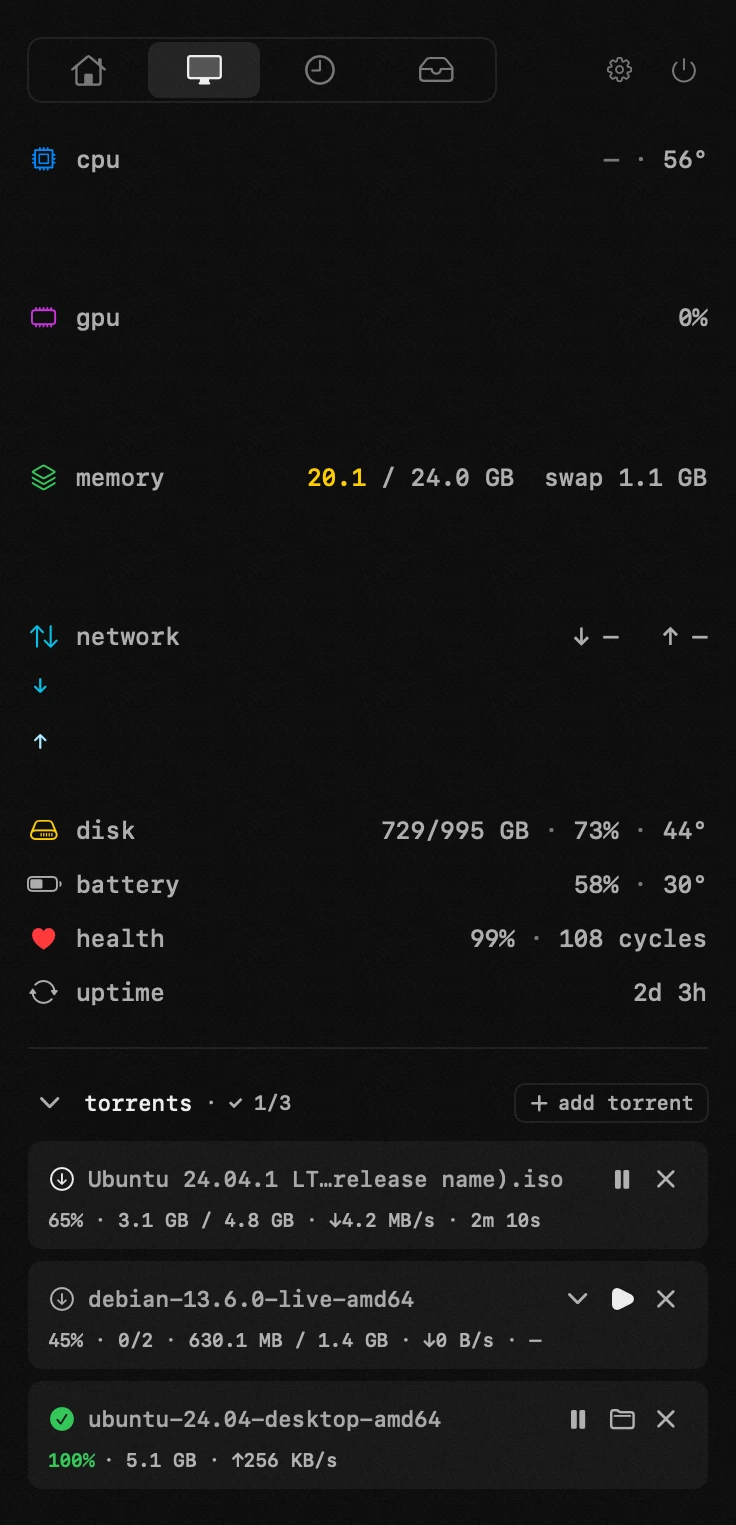
| what it is | torrents inside hop, a menu bar app for macOS |
|---|---|
| price | free — no trial, no pro tier, no account |
| licence | MIT, source on GitHub |
| requires | macOS 14 or later, Apple silicon or Intel |
| works offline | yes |
| data sent anywhere | none |
how to open a magnet link on a Mac
a .torrent dropped into the panel or a magnet link pasted into it, and the choice of what to actually download stays yours — before it starts and partway through, which is what saves the disk when a release turns out to be four seasons and you wanted one episode. progress sits in the same panel as everything else, not in a second app with a dock icon.
the engine it fetches on first use, the seeding limit and the default handler — the handbook end of this, in your own language: torrents in the guide
hop can register itself as the default handler for .torrent files and magnet links, so a click in the browser lands in the right place.
it stops seeding on its own
seeding continues after a download finishes, and forgetting about it is the normal outcome — a client left running for weeks, uploading in the background.
hop can stop at a ratio of 1.0 — given back as much as you took — but the switch ships off: a fresh install keeps seeding until you close the torrent or turn the setting on.
the engine is a separate download
the torrent engine is not bundled with the app. the first time you use this module, hop fetches it — about 26 mb — and only then.
so people who never touch it never carry it. that is also why the app itself is small.
how it compares
Transmission and qBittorrent are mature clients with settings for everything: scheduling, bandwidth rules, remote control, detailed peer information. that is what they are built for.
this module is deliberately small: a link, a file list, a progress bar and a ratio limit, inside an icon you already have open.
choosing what to download is the part that matters
most torrents are not one file. a pack arrives with duplicates in three formats, a folder of extras nobody asked for, and the one thing you wanted sitting in the middle of it.
hop lists the contents before anything starts and lets you tick only what you need — and change your mind partway through, deselecting something that turned out to be irrelevant while the rest keeps going.
on a laptop with a small disk that is not a convenience, it is the difference between fitting and not fitting.
ratio 1.0, and why the switch is worth finding
a ratio of 1.0 means you have uploaded as much as you downloaded — given back exactly what you took. stopping there is the polite thing to do, and hop has a switch for it in the torrent settings; it is off until you turn it on.
the alternative is what usually happens: a client left running for weeks, quietly uploading, noticed only when someone asks why the connection is slow.
frequently asked questions
- can i choose which files to download?
- yes, before starting or partway through. useful when an archive holds far more than you need.
- does it keep seeding forever?
- only if you switch it on. the setting «stop seeding when uploaded = downloaded» sits in the torrent settings and ships off, so out of the box seeding continues until you stop the torrent yourself.
- why is the engine downloaded separately?
- so that people who never use this module do not carry 26 mb they have no use for. it arrives the first time you open it.
- can it handle magnet links from my browser?
- yes. hop can be set as the default handler for magnet links and .torrent files.
- is it as capable as Transmission?
- no, and deliberately. scheduling, bandwidth rules and remote control are not here — a dedicated client is built for that kind of use.
other tools in hop
- text recognitionpull text off anything on screen — a video in Chrome or VLC, a locked pdf, another app's window.
- archiveszip, rar, 7z and the rest — unpacked right where you are looking.
- app uninstallerremove an app together with what it left in about thirty places.
what people pay for this
| app | price | what you get instead |
|---|---|---|
| Transmission | free, open source | magnet links in the panel, seeding stopped at ratio 1.0. |
| hop | free, MIT | drop a file or paste a magnet link — it downloads in the panel. |
prices checked at the vendor's own page on 2 september 2026
about the author

Anton Shakirovmakes hop
makes hop and every page on this site. twenty tools under a single menu bar icon, MIT licensed and open source. reads and answers issues and email himself.