app uninstaller for Mac
updated · by Anton Shakirov
dragging an app to the trash removes the app. it leaves the caches, the preferences, the support folders and the login items — scattered across about thirty places you will never visit. hop finds them and takes them along.
| what it is | app uninstaller inside hop, a menu bar app for macOS |
|---|---|
| price | free — no trial, no pro tier, no account |
| licence | MIT, source on GitHub |
| requires | macOS 14 or later, Apple silicon or Intel |
| works offline | yes |
| data sent anywhere | none |
macOS has no app uninstaller
there is no uninstall command in Finder, no uninstall pane in System Settings, and nothing for it in the command line. Apple's own instruction is to check whether the app shipped an uninstaller of its own, and if it did not, to drag it out of Applications and into the Trash. that is the entire official answer.
Apple's instruction, in full: delete or uninstall apps on Mac
what the trash actually removes
the bundle, and nothing else. an app writes far beyond it: preferences in one library folder, caches in another, support data in a third, a container of its own if it came from the App Store, sometimes a login item and a background helper. dragging the bundle away leaves all of that where it was.
most of the time this is only clutter. occasionally it is worse — you reinstall the app to fix it, and it comes back with the same broken settings you were trying to escape, because its old preferences never went anywhere.
the manual route, location by location: uninstall an app with its leftovers
what the command line gives you
less than its reputation suggests. the command people are pointed at is «pkgutil --forget», and its own manual page says plainly what it does: discard the receipt data about a package, but do not touch the installed files. it makes macOS forget that an installer ever ran. every file that installer put on the disk stays exactly where it is.
searching ~/Library by hand gets further, and then meets a second wall: the shell cannot read some of those folders until Terminal has Full Disk Access. ask it for a container it has no permission for and it answers «Operation not permitted», which from the outside looks a lot like «nothing here».
what «--forget» does and does not do: forgetting a package — MacAdmins documentation
why the shell needs permission for those folders: controlling app access to files in macOS
is a Mac app uninstaller worth installing
doing this by hand costs you neither money nor quality. it costs knowing there is anything to do at all: where macOS scatters the pieces, how to read an app's identifier out of its Info.plist, and which of the thirty-odd locations that identifier turns up in. Apple's instruction stops one step earlier than the problem does.
the rest of the cost is risk: a removal done by hand ends in «rm» on a path you worked out yourself, and «rm» has no undo. which of those matters depends entirely on what you are removing.
where a copy came from decides how much it leaves behind: App Store version versus the one from the site
| what you are after | the free route | with hop |
|---|---|---|
| removing an app you got from the App Store | drag it out, then delete its one folder in ~/Library/Containers — two drags and it is done | not needed — keep the two drags |
| a free uninstaller you already trust | AppCleaner has done exactly this for years and costs nothing | no reason to switch for this alone |
| doing it from the command line | there is nothing to run: «pkgutil --forget» drops the receipt and keeps every file | one drop on the row |
| a removal you can take back | «rm» is final, and so is a cleaner that reports a number and moves on | everything goes to the trash, so a mistake costs a restore |
| the job without a maintenance suite | the paid cleaners sell uninstalling inside a subscription with two dozen other tools | one module of a free app, no account |
so the short version: App Store apps are two drags and need no help. if AppCleaner is already on your Mac, keep it. a dedicated uninstaller earns its place on everything else — apps installed from a developer's site, apps you removed a year ago whose folders are still sitting there, and any removal you would like to be able to undo.
a different problem, and no uninstaller solves it: when the app will not go in the trash
what hop's app uninstaller removes
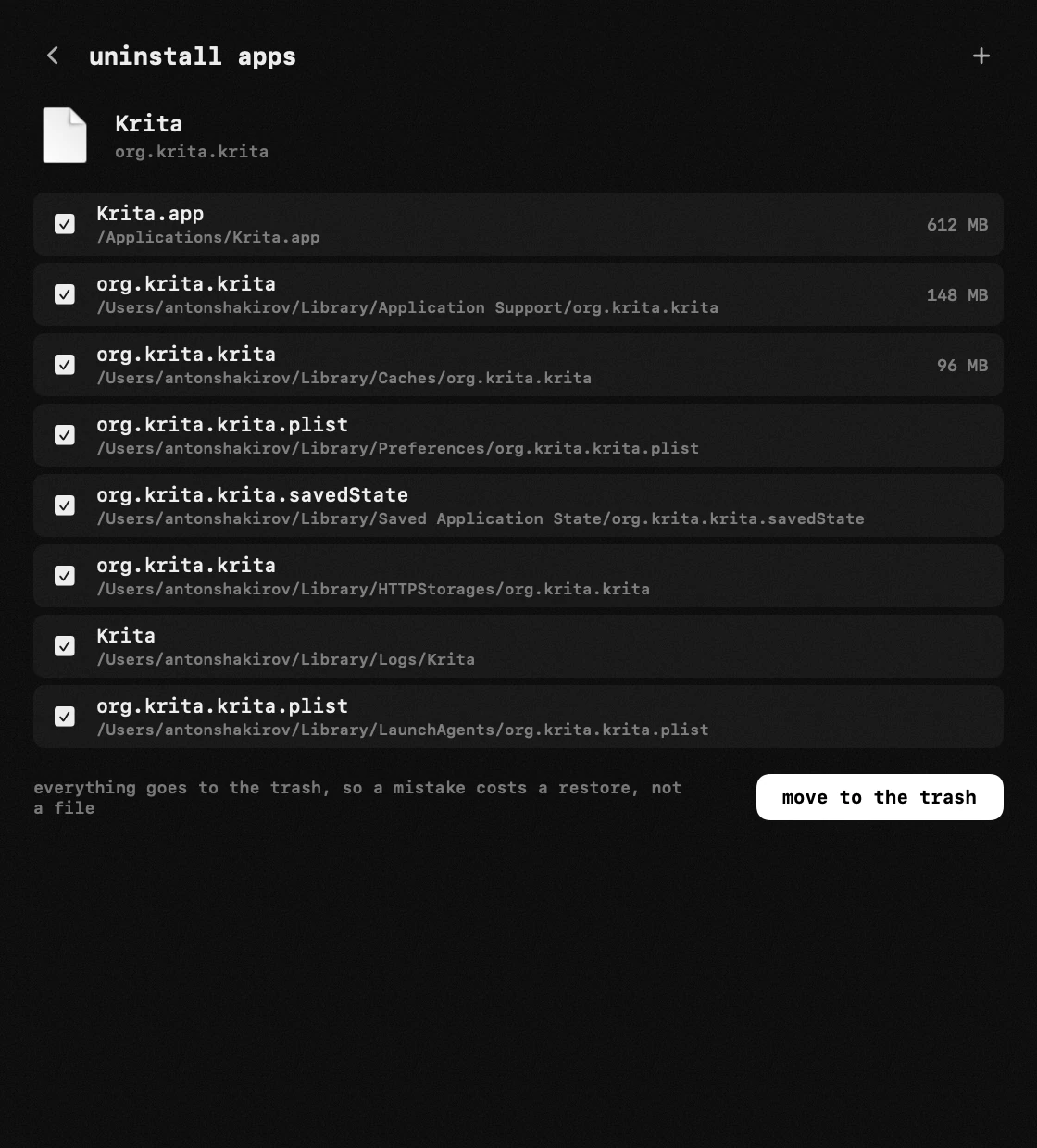
you hand it an app and see the whole tail that app grew before anything moves: every piece it left around the system, each with its own weight beside it. one confirmation sends the lot to the trash together — the part that turns «probably fine» into a decision you can actually make.
which buttons do what, how the list of leftovers is read and what happens to a removal abandoned halfway — the handbook end of this, in your own language: removing apps in the guide
the places it goes through are the ones apps actually write to: application support, caches, preferences, containers, launch agents, plug-ins, receipts and the rest — about thirty of them.
whatever macOS refuses to hand over is named, with the reason, rather than quietly skipped: an uninstaller that reports success on everything is telling somebody a story.
an app already in the trash is still recognised, so a removal abandoned halfway can be finished. so can the leftovers of apps long gone — they are listed on their own, with no bundle left to identify them by.
it moves things to the trash, it does not delete them
an uninstaller that deletes outright is one wrong click away from a bad afternoon. everything hop removes goes to the trash, so a mistake costs you a restore rather than a file — which is why the confirmation screen lists the pieces instead of counting them.
sizes, so you can see where the space went
the bundle and its data, weighed apart
every app in the list shows what it weighs, with the bundle and its data counted separately. an app of two hundred megabytes sitting on six gigabytes of cached data is common, and invisible. you find out whether removing it frees anything worth the trouble before you do it, not after.
you can also clear one app's cache without removing anything else of its, sorted biggest first. useful when the app is fine and only its cache has grown out of hand. the same module lists installers left behind in Downloads, on the Desktop and in Documents, and the trash with its size.
if the number you are chasing is the one macOS calls system data: find out what system data is using
it is an uninstaller, not a cleaner
hop does not promise to speed up your Mac, free mysterious gigabytes or fix problems you did not know you had. those promises belong to a genre of software that has earned its reputation honestly.
this removes an app and what it left behind. that is the whole job. the app is built of separate modules that each do one thing, and the one that watches disk and memory is a different one. it reports numbers; it does not sell you a fix for them.
the module that watches the numbers instead: system monitor for Mac
what the forty gigabytes a cleaner offers to free are actually made of: what the space a cleaner finds is made of
how it compares with other Mac uninstallers
AppCleaner is free, has done this well for years, and if it is all you need there is no reason to change.
the paid cleaners bundle uninstalling into a maintenance suite — scanning, cleaning, optimising — and charge a subscription for the whole thing.
this module is for people who want that job done without another icon in the menu bar — and who would rather removals went to the trash than straight out of existence. it is free, it needs no account, and it comes with the eighteen other things hop does.
the long version of the AppCleaner comparison: an AppCleaner alternative
and of the suite comparison: a CleanMyMac alternative
frequently asked questions
- is there a built-in app uninstaller on Mac?
- no. macOS has no uninstall command in Finder or System Settings. Apple's instruction is to use the app's own uninstaller if it shipped one, and otherwise to drag the app to the Trash — which leaves everything the app wrote outside its bundle.
- can i uninstall a Mac app from Terminal?
- not properly. «pkgutil --forget» is the command usually suggested, and its manual says it discards the receipt data without touching the installed files. it also cannot read some library folders unless Terminal has Full Disk Access.
- are files deleted permanently?
- no. everything moves to the trash, so anything removed by mistake can be put back.
- does it find files an app left months ago?
- it looks in about thirty locations where macOS apps normally write, and lists the leftovers of apps that are already gone separately. it will not find something an app hid deliberately somewhere unusual.
- can i remove an app that is already in the trash?
- yes. hop still recognises it, so a half-finished removal can be completed.
- will it make my Mac faster?
- no, and we would rather not pretend. it removes apps and their leftovers, which frees space. speed is a different problem.
- can i clear just an app's cache?
- yes, without touching anything else belonging to it. the list is sorted biggest first.
- how much does the uninstaller cost?
- nothing. hop is free and open source, needs no account and sends no telemetry, and the uninstaller is one of its modules rather than a paid tier.
other tools in hop
- vpn switcherevery vpn your Mac knows about, one switch each.
- clipboard historyeverything you copied — text, links, screenshots and whole files.
- screenshotsan area, a window or the whole screen — marked up before it leaves the screen.
what people do with this
what people pay for this
| app | price | what you get instead |
|---|---|---|
| CleanMyMac | from ~$40/yr | remove an app and its leftovers — without the maintenance theatre. |
| Setapp | from $14.99/mo | renting a catalogue of 250 apps, or installing one free app. |
| AppCleaner | free | removals go to the trash, and every app shows what it weighs. |
| hop | free, MIT | remove an app together with what it left in about thirty places. |
prices checked at the vendor's own page on 2 september 2026
about the author

Anton Shakirovmakes hop
makes hop and every page on this site. twenty tools under a single menu bar icon, MIT licensed and open source. reads and answers issues and email himself.