clipboard manager for Mac
updated · by Anton Shakirov
if you are on macOS 26 or later, try ⌘Space then ⌘4 before you install anything: your Mac already keeps a clipboard history, and for most of what sends people looking, that is the whole answer. a separate clipboard manager earns its place further out, when the thing you want is from last week rather than this morning, or when the Mac in front of you is older than Tahoe.
| what it is | clipboard history inside hop, a menu bar app for macOS |
|---|---|
| price | free — no trial, no pro tier, no account |
| licence | MIT, source on GitHub |
| requires | macOS 14 or later, Apple silicon or Intel |
| works offline | yes |
| data sent anywhere | none |
the clipboard history macOS 26 gives you for free
macOS 26 Tahoe put a clipboard history inside Spotlight. press ⌘Space, then ⌘4, and the last things you copied are listed there. click one and it is back on the clipboard, ready to paste. the first time you look, Spotlight puts a consent sheet in front of you instead of a list, because what you are switching on is a record of everything you copy. after that it is two keystrokes.
it is free, it is already on the machine, and for the ordinary version of this problem — you copied over the address you were about to paste, half an hour ago — it is the entire answer. a page selling you a clipboard manager should say that first, so: start there.
switching it on, the consent sheet, and what to do when ⌘4 opens something else — the procedure end of this, in full: find something you copied earlier
what the built-in history does not let you set
- System Settings → Spotlight carries three controls: a switch named «Results from Clipboard», a row reading «Clipboard history is available in Spotlight» with the retention beside it — eight hours on a Mac nobody has changed — and a button named «Clear Clipboard History». that is the entire panel.
- there is no depth setting, and nothing can be marked as worth keeping. the address you paste every day this month ages out on the same schedule as a verification code you used once.
- how long that schedule runs is on the panel, at the bottom: eight hours on a Mac nobody has changed, with a stepper to move it. Apple's own page documents the feature without mentioning the setting, which is why the figure is so widely reported as unpublished.
Apple documents the section and how to clear it, though not how long it keeps things: search your clipboard history in Spotlight
the clipboard is not the only thing that release moved, if you have just updated and things are not where you left them: what macOS 26 changed for menu bar apps
where a Mac clipboard manager still earns its place
against macOS 26 the honest comparison is horizon, not existence. Spotlight covers today, for free, and nothing here is going to argue with that. the two part company on how far back you can reach, and on what happens when the Mac is older than the feature.
| what you are doing | the built-in history | with hop |
|---|---|---|
| you copied over the address you were about to paste, half an hour ago | ⌘Space, ⌘4, click it. free, and already there | not needed. use Spotlight |
| the snippet you want is from Tuesday | the window is yours to set, but it is a clock, not a count | the last hundred entries, three hundred if you raise it |
| one address you paste over and over all month | nothing can be marked as worth keeping; it ages out with the rest | no pinning here either. it simply stays until three hundred newer things push it off |
| the Mac in front of you is on Sequoia or earlier | there is no clipboard history at all | works on macOS 14 and up |
| you want the text you just lifted off a screenshot | only what you copied yourself reaches the list | recognition and the colour picker write into the same history |
the horizon is the whole argument
a day of ordinary work is dozens of copies. that is what makes the difference practical rather than theoretical: the thing you want from Tuesday has aged out of the window and sits behind several hundred newer entries besides. depth and reach are the same problem wearing two hats, and a hundred entries, three hundred if you raise it, is what hop answers with.
so the rule is short. if what you want is from today, the built-in history is the end of it and you do not need us. the simple case stops the moment you find yourself reaching for something older than this morning, or copying the same snippet back in for the fourth day running.
before macOS 26 there is nothing to compare with
on Sonoma and Sequoia this is not a worse clipboard history, it is no clipboard history. the Mac holds exactly one item, and the one before it was never written down, so nothing recovers it after the fact. hop runs on macOS 14 and up, which is the other half of who this module is for.
text pulled off a screenshot or a video frame lands in the same list as everything else you copied: text recognition
what it is like in use
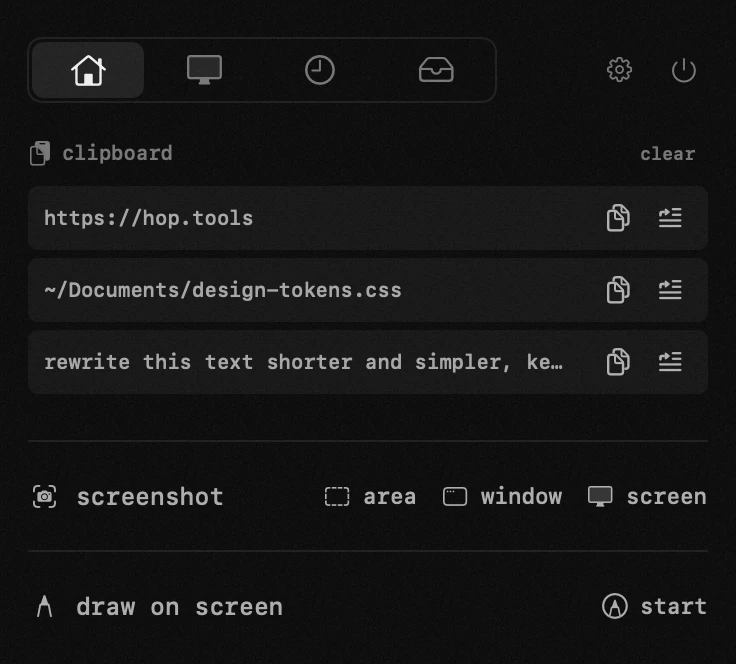
the list opens with the panel: the last hundred things you copied, three hundred if you raise it, newest first, with text, links, screenshots and files in the one place. type to narrow it down, then either take an entry back onto the clipboard or drop it straight into the app you were just working in.
a colour picked off the screen and text lifted by recognition land in that same list as they happen. neither is something you copied, so neither has any route into the built-in history — this is the one place where the two are not doing the same job at different depths.
which button does what, where the size of the history is set, how an entry leaves as a file, and what the paste button needs from macOS — the handbook end of this, in your own language: the clipboard in the guide
the colour picker end of that, if hex codes are what you keep losing: get the hex code of a colour on screen
and if the thing you wanted would not let you select it in the first place, the clipboard is the wrong end of the problem: copy text from a video or a locked document
what never enters the clipboard history
anything a password manager marks as concealed is skipped and never stored. this is not an advantage over the built-in history: macOS works on the same principle, and a clipboard manager that got it wrong would be dangerous rather than merely worse. it gets stated plainly here because it is the first thing people ask.
the history stays on this Mac. no sync, no server, no account, and nothing copied on your iPhone appears here either: Universal Clipboard carries the latest item across and keeps no history on either side.
the clipboard holds typed representations rather than a string, which is why a file can sit on it while a shell tool reports nothing at all: NSPasteboard
one thing worth knowing before you install: pasting straight into the app you were last in means acting on that app's behalf, and macOS keeps that behind an Accessibility permission you grant once. everything else works without it.
why a clipboard manager asks for that permission at all, and what it can and cannot do with it: why Mac apps ask for accessibility
Spotlight took over app launching in the same release, so the panel it opens may be unfamiliar for more than one reason: open your apps without Launchpad
frequently asked questions
- does macOS have a clipboard manager built in?
- since macOS 26 Tahoe there is a clipboard history inside Spotlight — ⌘Space then ⌘4, once you allow it. it is not a full manager: what it gives you is a time window, eight hours by default, and nothing can be held back from ageing out of it. on Sequoia and earlier there is nothing at all.
- do i still need a clipboard manager on macOS 26?
- for anything you copied today, no. use Spotlight and save yourself an install. the case for a separate one is reach: the last hundred entries, three hundred if you raise it, rather than a time window that starts at eight hours.
- how long does the built-in clipboard history keep things?
- eight hours on a Mac nobody has changed, and the figure sits at the bottom of System Settings → Spotlight with a stepper beside it. Apple's own page documents the section without mentioning the setting, which is why so many pages report the period as unpublished.
- can i pin something so it stays?
- not in the built-in history, and not in hop either: neither has pinning. what hop offers instead is depth. an entry stays in the list until enough newer things push it off the end, which for a hundred or three hundred entries is a good deal longer.
- does it keep copied files?
- yes, by name, and pasting puts the real file back rather than a path to it. several grabbed at once show as «name +N».
- are passwords saved in the history?
- no. anything a password manager marks as concealed is skipped, on the same principle macOS itself uses.
- is the history synced to my other devices?
- no. it stays on this Mac — no account, no server, no sync. anything copied on an iPhone does not appear here either.
- can i search what i copied?
- yes, type to filter the list. screenshots, links and files are in there alongside plain text, and so are colours picked with hop's colour picker and text lifted by its recognition.
other tools in hop
- window layoutseighteen zones, one click or one hotkey.
- draw on screena transparent layer over the live screen, seen by everyone on the call.
- keep awakedownloads, renders and calls run to the end. even with the lid closed.
what people do with this
what people pay for this
| app | price | what you get instead |
|---|---|---|
| Paste | $2.49–3.99/mo, $29.99/yr, $89.99 once | history that reaches past the window Spotlight gives you, for nothing. |
| Raycast | free + Pro $10/mo or $96/yr | the clipboard and window layouts you open it for, in the menu bar instead. |
| Alfred | free + Powerpack from £34 | clipboard history without the Powerpack — and without typing. |
| Maccy | free, or $9.99 in the App Store | clipboard history that also keeps whole files, by name. |
| hop | free, MIT | everything you copied — text, links, screenshots and whole files. |
prices checked at the vendor's own page on 2 september 2026
about the author

Anton Shakirovmakes hop
makes hop and every page on this site. twenty tools under a single menu bar icon, MIT licensed and open source. reads and answers issues and email himself.