clipboard history
updated
The last 100 (up to 300) things you copied – text, images and files – one click to copy back or paste straight into the previous app. Copied files are kept by name (several at once show as "name +N"), and pasting puts the actual file back. Passwords and other concealed input are never stored.
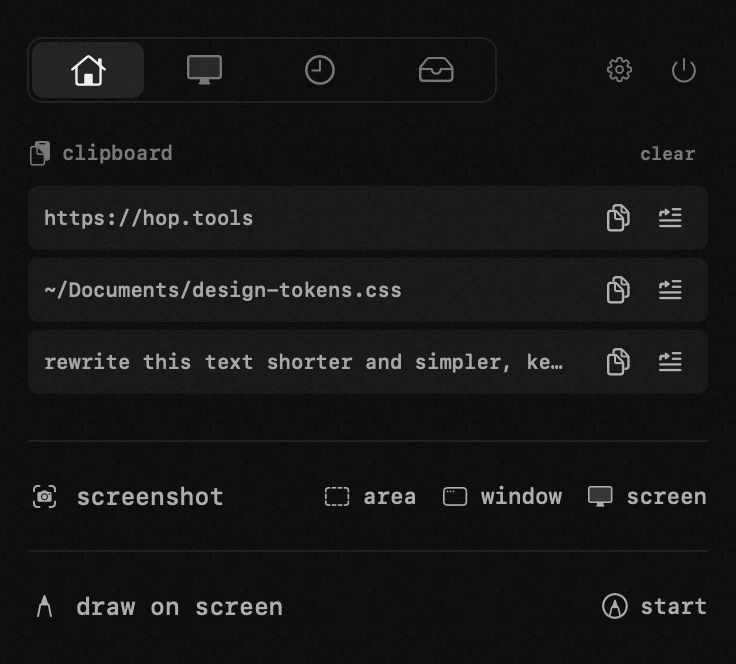
where the clipboard lives
the module is a row in the panel, under the asterisk in the menu bar. if the row is not there, open settings from the panel, go to modules and switch clipboard on — a module that is off leaves the panel and stops running entirely.
what a row is made of
- the entry itself on one line, cut at the end rather than the middle, so what you read is the beginning of what you copied.
- a small document glyph in front of a copied file, a thumbnail in front of an image, a square of the colour itself in front of a colour taken with the eyedropper.
- several files copied at once read as «name +N» and come back as all of them.
the buttons at the right of a row
- save as a file writes the entry to disk as txt, md, pdf or docx. it appears only on text entries — an image or a copied file has no document to write — and only once saving is switched on in settings. a green tick on the row says the file was written, because the file itself lands somewhere you are not looking.
- copy puts the entry back on the clipboard. the row answers with «copied» and a tick for a couple of seconds, then the buttons come back.
- paste puts it back on the clipboard and presses ⌘V for you, in the app you were in before the panel opened.
when the paste button seems to do nothing
pressing keys on your behalf is what macOS calls accessibility, and until you grant it the paste button can only do half the job: the entry lands on the clipboard and nothing else happens. this is the one thing here that reads like a bug and is not one. the panel stays open and says so, with a button that takes you straight to the right pane of System Settings.
clicking a row to copy it back needs none of this, and never has.
finding something you copied a while ago
the search field appears when the list is expanded — collapsed, the whole of it is already in front of you. it filters as you type, across text, links and file names alike. the arrows beside the header stretch the list to twenty rows and shrink it back to five, and how many rows you see by default is «visible rows» in settings, one to ten.
what is kept, and what is never kept
- the last hundred entries, up to three hundred: «clipboard history» in settings takes anything from five to three hundred.
- nothing ages out by the clock. an entry stays until enough newer things push it off the end — which is the whole difference from the history macOS keeps in Spotlight.
- images are counted apart: the twenty most recent, and nothing over 25 mb.
- one text entry is kept whole up to 64 mb, so a book, a log or a page of source comes back in full rather than clipped.
- anything a password manager marks as concealed never enters the list at all.
where it is stored, and how to wipe it
the history stays on this Mac, in hop's own data beside its settings: no server, no account, nothing carried to your other devices. «clear» empties the list in one go.
a copied file is kept as its path rather than as a copy of the file, so clearing the history — or letting an entry fall off the end — never touches anything on disk.
what else writes into this list
a colour taken with the eyedropper and text lifted by recognition both land here as they happen, already on the clipboard and ready to paste. neither is something you copied, so neither has any way into the built-in history.
- bring back – click a row to put it on the clipboard again; the copy button copies, the insert button pastes straight into the active app.
- files – a copied file is stored as its full path; clicking the row puts the file itself back on the clipboard: paste it in Finder as a file, or as the path in a text field.
- save as a file – an entry can leave as a txt, md, pdf or docx file, named after its own text. switch it on in the clipboard settings, pick the format there, and say whether hop should ask for the name and the folder; without asking, files land on the desktop.
- privacy – entries stay on this Mac only; concealed content (password managers) is never stored.
- history size – how many recent entries to keep is set in the clipboard settings.
- expand – the arrows next to the header stretch the list to 20 entries and shrink it back to 5.
- clear – wipes the whole history at once.
app permissions
accessibility — pasting into the app underneath, moving windows, the keyboard lock, drawing while a key is held.
settings
- clipboard history
- how many recent entries to keep
- visible rows
- save an entry as a file
- file format
- ask for the name and the folder
- without it, files land on the desktop