keep your Mac awake
updated · by Anton Shakirov
a long download, a render, a build, a call on an external display. your Mac has no idea any of it matters, and dims the screen right in the middle. hop holds it awake for as long as you say, and hands sleep back the moment you are done.
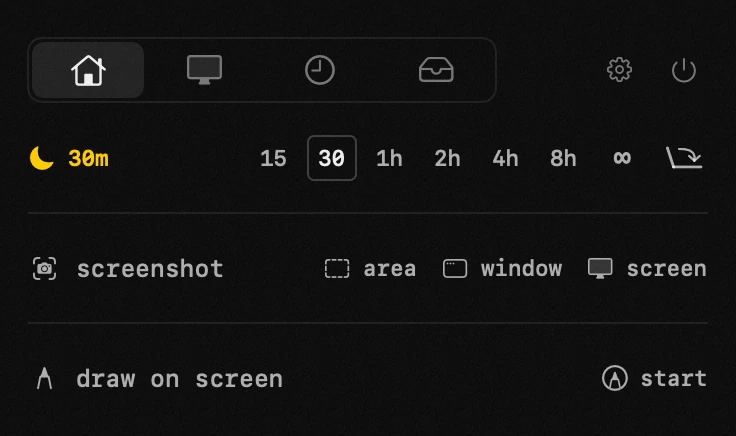
| what it is | keep awake inside hop, a menu bar app for macOS |
|---|---|
| price | free — no trial, no pro tier, no account |
| licence | MIT, source on GitHub |
| requires | macOS 14 or later, Apple silicon or Intel |
| works offline | yes |
| data sent anywhere | none |
when you need to keep the Mac awake
- a download or an upload that has to finish unattended
- a render, a build or a long export you are not sitting over
- a presentation, where a dimming screen in front of a room is its own kind of pain
- a film on an external display, with the laptop lid shut
- anything running over ssh that dies the moment the machine dozes off
the long export is the common one: a video that has to come out under a size limit takes as long as it takes, and the Mac dozes off halfway through. compress video for reels and shorts
the free ways to keep a Mac awake
this is not a paid-against-free question, and pretending otherwise would be dishonest. several free apps do only this and do it well, and macOS itself ships a command for it. the catch is that they hold different things, and the differences are where people come unstuck.
which caffeinate flag you actually need
`caffeinate` lives at /usr/bin/caffeinate and needs no installing. run it bare and it prevents idle sleep, nothing else. `-d` holds the display, `-i` idle sleep, `-m` the disk, `-s` system sleep — but `-s` is valid only on AC power, so on battery it quietly does nothing.
`-t` takes a timeout in seconds, not minutes, and is ignored outright when you hand caffeinate a utility to run. the flag most people want and never find is `-w <pid>`: it holds until the process with that pid exits, which is the honest way to cover a job whose length you do not know in advance.
what none of them do is survive a closed lid. caffeinate asks macOS not to doze off on its own, and shutting the lid is not dozing off on its own.
the undocumented pmset flag that sticks
there is one more switch, and it is why this question keeps coming back: `sudo pmset -a disablesleep 1`. it does hold the Mac awake with the lid shut and no external display — the case macOS otherwise refuses outright.
it is also undocumented, in both directions. `man pmset` does not contain the word `disablesleep` at all, and `pmset -g` prints it back under a different name — `SleepDisabled`, in the «System-wide power settings» block at the top. the thing you set and the thing you read are spelled differently, and neither appears in the manual. checked on macOS 26.6.2.
this is not an oversight in one person's reading. the most thorough public write-up of pmset walks through the settings one by one and does not list this flag either. The Eclectic Light Company — power management in detail
and it is sticky. it survives a reboot and comes off only by hand, with `sudo pmset -a disablesleep 0`. set it for one evening, forget it, and your Mac never sleeps again — including the time it spends in a bag with the lid shut.
the closed-lid case has its own page: what clamshell really requires, how to find which process is holding your Mac awake, and what happens to the heat. keep a MacBook awake with the lid closed
what the free route costs you
at the desk, with a job that runs an hour, `caffeinate -t 3600` covers it. so does any free one-button app already sitting in your menu bar. by the plain ability to keep a Mac awake, none of this is better or worse than hop, and you should not switch tools over it.
it costs on two other things. the first is what you have to know before you start: which flag holds which kind of sleep, that one is dead on battery, that the timeout counts seconds, that none of it covers a closed lid, and that the flag which does is not in the manual. the second is that nothing on the free route has an end built into it. caffeinate stops when the window closes or the process exits; the pmset flag stops when you remember. neither can be told «hold for two hours, then let go».
how hop keeps your Mac awake
one click, no password, and a length you choose: fifteen minutes, eight hours, or until you say otherwise. the display can stay lit or go dark while the machine keeps working, and the menu bar says which, so the question «is it still on?» never comes up in the middle of a long upload.
where the durations are set, what the lid mode needs and how the icon reads — the handbook end of this, in your own language: no sleep in the guide
there is no settings panel to dig through and nothing to undo afterwards. your energy saver preferences are untouched — hop holds the Mac awake while it is on, and steps out of the way when it is not.
the duration is the point, and it is the same idea as the timer one tab over: you say how long, and it ends without you. a timer for Mac
| what you are doing | the free route | with hop |
|---|---|---|
| a download, and you are at the desk watching it | caffeinate -i in a terminal window you leave open | not needed — use the command |
| a build that ends at some point, and you are not watching | caffeinate -w <pid>, if you know the pid | set eight hours and walk away |
| hold it for exactly twenty minutes | caffeinate -t 1200 — seconds, not minutes | pick the duration in the panel |
| the lid has to shut, with no external display | sudo pmset -a disablesleep 1, sticky until you undo it | switch it on, it holds the same case |
| you are done and want the Mac to behave normally again | undo the flag by hand, or it stays across reboots | quit hop and normal sleep is back |
the lid can stay closed
macOS will run with the lid shut only on its own terms. Apple lists them for closed-lid use: the Mac on power, an external display connected, and an external keyboard and mouse or trackpad. outside those conditions, closing the lid means sleep, and whatever was running stops with it. Apple Support — dual monitors with the lid closed
with keep-awake on the lid stops mattering. the screen goes dark and the machine keeps working: the download finishes, the film keeps playing, the build runs to the end.
one warning. a Mac held awake with the lid shut still makes heat, and a closed laptop in a bag has nowhere to put it. hold it awake on a desk, not in a rucksack.
what the machine is doing while it is held awake — power draw, temperatures, what the night cost the battery — reads out in the same panel. system monitor for Mac
and a Mac left awake and unattended is a Mac anyone can type into. lock your Mac keyboard
it gives sleep back on its own
the failure mode of every app like this is forgetting to turn it off. a Mac that never sleeps burns battery, runs warm and eventually surprises you.
so keep-awake ends by itself: when the timer runs out, or when you quit hop. there is no state left behind that outlives the app.
the opposite complaint is just as common and has a different cause: a Mac that will not stay asleep and lights up at three in the morning. why your Mac wakes up at night
and when sleep is what broke something, the usual casualty is the connection that was up before the machine dozed off. reconnect a vpn that drops after sleep
when a Mac sleeps or wakes at moments you did not ask for, Apple's own list of causes is the place to start. Apple Support — if your Mac sleeps or wakes unexpectedly
nothing is sent anywhere
hop has no accounts, no profiles and no telemetry. holding the Mac awake is a local call to the system and nothing about it leaves the machine.
frequently asked questions
- does it keep the screen on, or just the Mac?
- your call. by default the Mac stays awake and the screen can go dark — that is the point when the lid is shut or a long job is running. if you need the display lit too, that is a switch.
- does caffeinate keep a Mac awake with the lid closed?
- no. caffeinate asks macOS not to doze off on its own, and closing the lid is a different thing. without clamshell conditions — power, an external display, an external keyboard or mouse — the Mac sleeps when the lid shuts, caffeinate or not.
- how do i undo sudo pmset disablesleep?
- `sudo pmset -a disablesleep 0`. check it with `pmset -g`, where it reads back as SleepDisabled at the top rather than under the name you set it with. it survives reboots, so it will not go away on its own.
- does it change my energy saver settings?
- no. nothing in System Settings is touched. hop holds the Mac awake while keep-awake is on, and stops the moment it is off.
- what happens if i forget to turn it off?
- set a duration and it ends by itself. quitting hop also returns normal sleep straight away.
- will my Mac still sleep when the battery runs low?
- macOS keeps its own safeguards. keep-awake asks the system not to idle-sleep; it does not override low-battery behaviour.
- is it really free?
- completely. no trial, no pro tier, nothing to unlock — and the other eighteen tools come with it.
other tools in hop
- color pickerany pixel on screen, in hex, rgb and hsl at once.
- file converterimages, video, audio and documents. offline, with the size shown up front.
- time trackerwhere the hours went, kept on this Mac and nowhere else.
what people do with this
what people pay for this
| app | price | what you get instead |
|---|---|---|
| Amphetamine | free | the same keep-awake switch, without a separate app for it. |
| Caffeine | free | the same coffee cup, behind the same icon as eighteen other tools. |
| hop | free, MIT | downloads, renders and calls run to the end. even with the lid closed. |
prices checked at the vendor's own page on 2 september 2026
about the author

Anton Shakirovmakes hop
makes hop and every page on this site. twenty tools under a single menu bar icon, MIT licensed and open source. reads and answers issues and email himself.