lock your Mac keyboard
updated · by Anton Shakirov
you want to run a cloth over the keys, and the Mac wants to type. there is no setting for this: macOS has never shipped a switch that turns the keyboard off, and the two things people reach for instead — the lock screen and the accessibility panel — do something else entirely. hop freezes every key while the rest of the Mac keeps running.
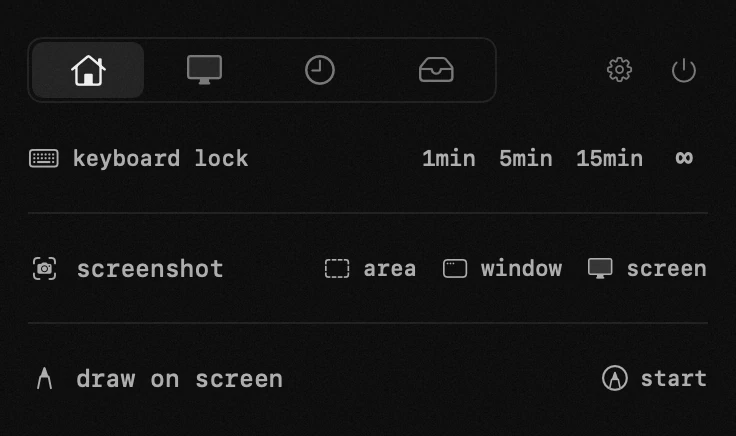
| what it is | keyboard lock inside hop, a menu bar app for macOS |
|---|---|
| price | free — no trial, no pro tier, no account |
| licence | MIT, source on GitHub |
| requires | macOS 14 or later, Apple silicon or Intel |
| works offline | yes |
| data sent anywhere | none |
when you need a keyboard lock
- wiping crumbs and dust off the keys without closing anything
- a cat that walks across the desk at the worst possible moment
- a small child who has discovered that keys make things happen
- watching something on an external display, where a nudged key changes the volume or skips a track
- handing the machine to someone who only needs to look at the screen
if you got here to clean the keys, the wiping half of the job has its own page — what Apple says about wipes, alcohol and compressed air, and whether the keycaps come off on your model: clean your keyboard without shutting down
why macOS has no keyboard lock
be exact about this, because the advice you will find is mostly wrong, and one piece of it is confidently wrong.
does the accessibility keyboard turn the physical keyboard off?
no. several pages ranking for «disable keyboard Mac temporarily» say it does, which is why people arrive here having already tried something that could not have worked. the Accessibility Keyboard is an on-screen keyboard — it exists so someone can operate a Mac without a physical one, not so a physical one can be switched off. turning it on puts a panel on your screen and changes nothing about the keys under your cloth.
Apple's own description leaves no room for the other reading: use the Accessibility Keyboard on Mac
the neighbours in that panel are not it either. Accessibility → Keyboard holds five things, and sticky keys and slow keys are the two that get suggested. both change how a press is interpreted — whether modifiers latch, how long you must hold a key before it counts — not whether it registers. set slow keys to its longest delay and a cloth resting on a key still types it, and afterwards you have a keyboard that feels broken until you remember to switch it back.
the full list of what that panel contains, from Apple: change keyboard accessibility settings on Mac
what about the lock screen?
the lock screen is the answer everyone gives, and it is nearly right: nothing you type does damage. it also is not off. every key goes into the password field, a cloth crossing Return reads as a submitted password, and enough of those and macOS starts offering to reset it. failed attempts are rate-limited on top, so the wipe can end with you waiting to be let back into your own Mac.
Gary Rosenzweig walks through both failure modes in answer to exactly this question: how can I lock the keyboard on my MacBook so I can clean it
and shutting it down?
that works, and it costs you every open window — the download, the call, the render. it is also less absolute than it sounds: on current Apple silicon laptops the keyboard and trackpad turn the Mac on, which Apple names as the thing that survives even when you stop the lid from starting it up.
the behaviour, and the models it applies to: prevent a Mac laptop from turning on when opening its lid
losing the session is the real cost of that route, and the opposite problem — a Mac that must stay running while you are not touching it — has a proper answer that is not the lid: keep a MacBook awake with the lid closed
so the honest summary is short. there is no built-in way to make the keys stop, which means the question is not «built-in or app» — it is which app. if you already have one that works, keep it; nothing below is a reason to switch. the difference starts where the lock stops being a once-a-year thing.
the other half of a keyboard you cannot leave alone is the machine dozing off mid-job, and that one macOS does answer badly rather than not at all: keep your Mac awake
how hop locks the keyboard
you give it a length — one minute, five, fifteen, or until you end it yourself — and the keyboard goes quiet while everything else carries on: the download, the call, the render. a cover on the screen says what is happening and the menu bar icon turns into a keyboard, so nobody watching has to work out why typing stopped.
the durations, what the cover shows and how the lock is ended early — the handbook end of this, in your own language: the keyboard lock in the guide
the whole keyboard, media row included
half-measures are useless here. a lock that leaves brightness, volume and the media row alive still lets a cloth mute your call or skip your track — and those are the keys that are easiest to catch by accident.
so every key goes quiet, function row and all. a short press of the power key is swallowed too. holding it still forces the Mac off, because that is handled in hardware and no app can sit in front of it.
how do i unlock it again?
four ways, and not one of them is a key — which is the point, and the first thing anyone sensibly asks before switching such a thing on. the cover's button, the panel's button, opening hop from the menu bar, or holding esc and shift together for five seconds. the mouse and trackpad stay live throughout, on purpose: they are your way out.
hop against a free keyboard blocker
macOS gives you nothing here, so the comparison is not against a built-in path. it is against the free route: single-purpose blockers, several of them open source, that do this one job and nothing else.
| what you are doing | the free route | with hop |
|---|---|---|
| one wipe, and a blocker is already installed | it does exactly this | no reason to switch — keep the one you have |
| you want a way out that is not a key | some of them freeze the trackpad as well, so the only exit is waiting out a timer | trackpad stays live, and there are four ways back |
| installing it for a thirty-second job | an unsigned build from a repo, opened past Gatekeeper by hand | signed with an Apple Developer ID and notarized, so it opens like any app |
| it comes up weekly — the cat, the toddler, the external display | another single-purpose app living in the menu bar | one of twenty tools in a panel you already have open |
| granting accessibility permission | each utility asks for it separately, and it is the broadest permission macOS has | one grant, shared by the modules that need it, revocable in settings |
that last row has a story behind it: accessibility is the permission most Mac utilities ask for, and it is broader than its name suggests — why a Mac app asks for accessibility permission
keys are dropped, never read
an app that intercepts a keyboard deserves suspicion, so it is worth being precise: while the lock is on, key presses are discarded. nothing is recorded, nothing is stored and nothing is sent anywhere.
hop is open source, has no accounts and no telemetry — the only thing it ever sends is its own version number when it checks for an update. the code is on GitHub if you would rather read it.
when the keyboard lock is not what you want
- an external keyboard is the problem — unplug it or switch it off. the lock covers the built-in one, which is the one you cannot detach.
- you want the Mac secured rather than quiet. a lock keeps your session open and visible; if you are walking away, the lock screen is the right tool and the keyboard question does not arise.
- you want the keys dead through a restart. the lock is a duration inside a running session and ends with it — nothing survives a reboot, by design.
- a specific key has stopped working on its own. a lock does not address that, and a key that failed after a clean is usually something under the cap rather than moisture.
and if a blocker you tried first is still sitting on the disk months later, taking it off properly is its own small job: uninstall an app with its leftovers
and if the lock appears to do nothing at all this autumn, check the menu bar before the module: macOS 26 rebuilt that part of the system and a wave of menu bar apps misbehaved for weeks — what macOS 26 changed for menu bar apps
frequently asked questions
- how do i lock the keyboard on a Mac?
- macOS has no setting for it — none in System Settings and none in accessibility. dropping the input takes a tool that intercepts it; in hop it is one tap and a duration.
- does the accessibility keyboard disable the physical keyboard?
- no. it is an on-screen keyboard for people working without a physical one, and it changes nothing about the keys on the machine. several pages recommending it for cleaning are simply wrong.
- does the lock screen disable the keyboard?
- it stops keys from doing anything harmful, not from registering. you are typing into the password field, a stray Return reads as a failed attempt, and macOS then limits how often you can try again.
- does the trackpad stop working too?
- no, the mouse and trackpad stay live — that is one of the ways you unlock. only keys are frozen.
- how do i unlock if the lock is set to infinity?
- four ways: the cover's button, the panel's button, opening hop from the menu bar, or holding esc and shift together for five seconds. holding the power key always works too, because hardware handles it.
- does it record what i type?
- no. while the lock is on, presses are discarded without being read. nothing is stored and nothing leaves your Mac.
- will my Mac keep working while the keyboard is locked?
- yes. calls, downloads and renders carry on untouched. only the keyboard is out of the picture — that is the whole difference from shutting down.
- does it need special permissions?
- macOS asks for accessibility permission the first time, because intercepting keys is a privileged action. you can revoke it in System Settings at any point.
other tools in hop
- speed testdownload, upload and responsiveness — measured through Apple's own servers.
- app firewallsee which programs go online, and where — block any of them with one click.
- window layoutseighteen zones, one click or one hotkey.
what people do with this
about the author

Anton Shakirovmakes hop
makes hop and every page on this site. twenty tools under a single menu bar icon, MIT licensed and open source. reads and answers issues and email himself.