app firewall for Mac
updated · by Anton Shakirov
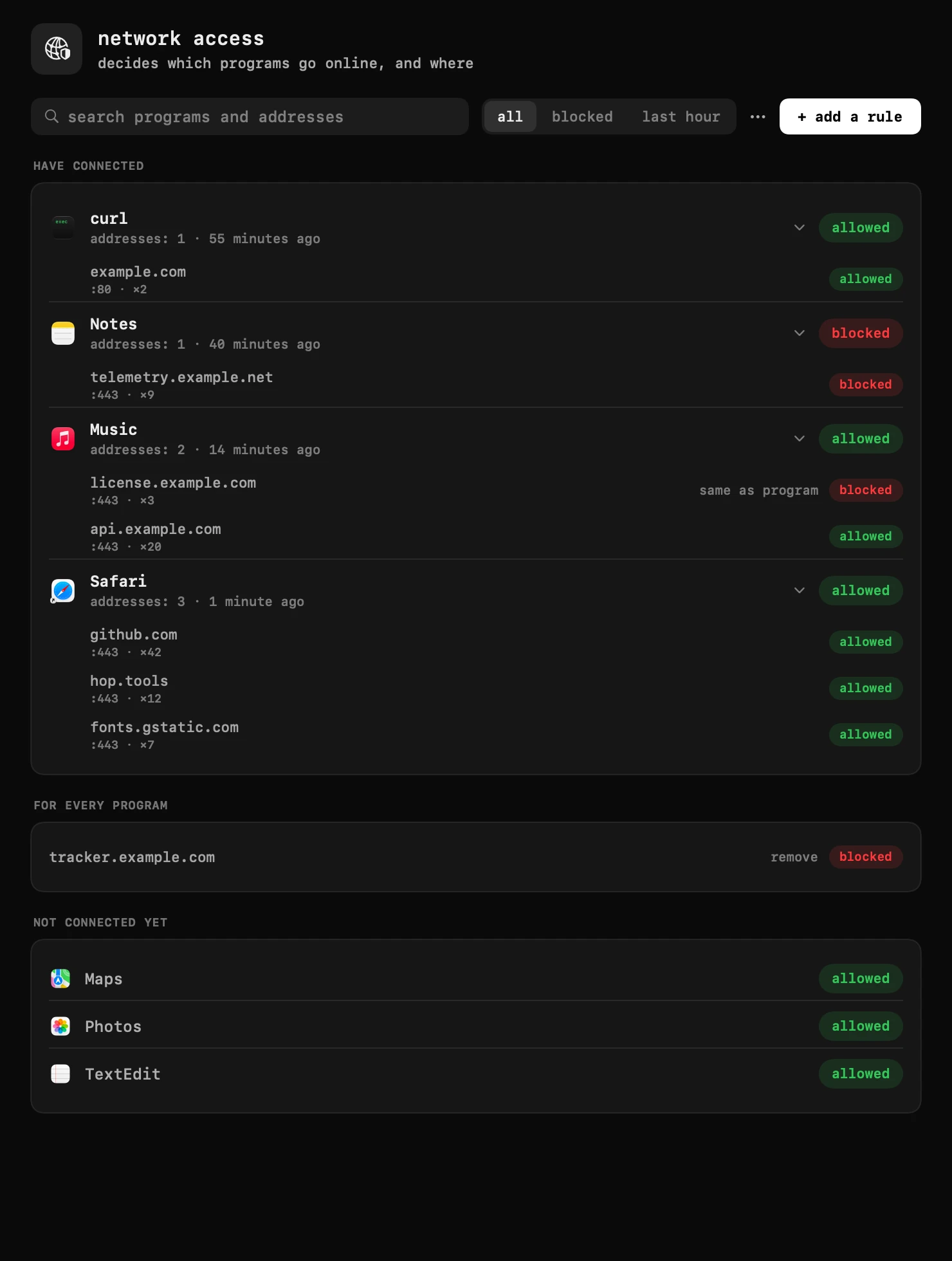
hop shows every program that goes online, and the addresses it reached, then lets you cut any of them off — the whole program, or one address of it. it runs on the network filter macOS provides for exactly this job, the same kind LuLu and Little Snitch use, and it decrypts nothing.
| what it is | app firewall inside hop, a menu bar app for macOS |
|---|---|
| price | free — no trial, no pro tier, no account |
| licence | MIT, source on GitHub |
| requires | macOS 14 or later, Apple silicon or Intel |
| works offline | yes |
| data sent anywhere | none |
who reaches for an app firewall
the usual trigger is noticing an app talks to the internet more than it should: a utility phoning a license server on every launch, a background helper syncing something nobody asked it to, a game reaching addresses that have nothing to do with playing it. macOS itself will not tell you which programs are connected right now or where — Activity Monitor's network tab shows bytes moved, not addresses reached.
the other trigger is wanting a rule in place before that ever happens: block one server for an app you don't fully trust, or keep an installed-but-unused app off the network entirely, without touching your router, your DNS or a VPN that would affect everything at once.
what it shows, and what one click does
every program that has gone online appears in a list with the addresses it reached. a click on the program's own label cuts it off the network entirely; open the program and a single address can be blocked on its own — a license check, say, while the rest of its traffic keeps going through. an address rule always wins over the program's rule, so one exception does not require turning the whole switch back on.
a rule does not need the program to have connected first. every installed app is listed whether it has gone online or not, so a program can be blocked before it ever gets the chance to reach out.
- block a whole program, or one address of it, in one click
- set a rule before a program ever connects — pick it from the list or the Applications folder
- load a list of addresses from a file (one per line, or a hosts file) and block them for every program at once — a line can also name a program: `com.example.app license.example.com`
- save your current rules back to a file
- sort the list by when a program first appeared, by name, or recent first
the full walkthrough — what each label and section in the window means — lives in the guide, in your own language: traffic blocking in the guide
how the filter itself works
hop does this through the network filter macOS provides for exactly this job — a system extension, the same category LuLu and Little Snitch build on. the first time the module runs, macOS asks you to allow it in System Settings; that is a one-time system dialog, not something hop can skip or pre-approve.
the filter decides at the first packet of a connection and never looks inside it: it blocks a whole server, never one page on it, because that is as far in as a content filter operating at the connection level can see. if the filter ever stops — a macOS update, a crash, anything — the internet keeps working; nothing is blocked until the filter is back. turning the module off in settings stops your blocks specifically, not your Mac's network access.
Apple's own description of the network extension framework this class of app is built on: Network Extension, Apple Developer documentation
quiet by default, and an optional prompt
the module is on by default and blocks nothing on its own: with no rules set, every connection goes through exactly as it would without hop installed. it does not ship a list of trackers or ad servers to pre-block, and it will not silently start cutting programs off — every block on the list is one you set.
asking about new connections is a separate setting, off by default. switched on, a card in the top right asks about a connection no rule covers — for that address alone, or the whole program — instead of hop deciding on its own.
what it is not, and where it stops
hop is not a VPN and does not route or inspect your traffic on its way anywhere; it either lets a connection through unchanged or refuses it at the first packet. it cannot filter by URL or page inside an encrypted connection — HTTPS hides everything past the server address, so "block this one page" is not a rule this kind of filter can express, on hop or on any app firewall built the same way.
it also is not a DNS blocker or a content filter for what a browser tab shows: those work by resolving or rewriting names, a different layer with different tradeoffs. and it collects nothing about what it sees — the list of addresses and the rules you set stay on this Mac.
| what you want | does hop's app firewall do it | what to use instead |
|---|---|---|
| see which programs went online today, and where | yes — that is the whole first screen | — |
| block one app from the network entirely | yes — one click on its label | — |
| let an app reach its own service but block one third-party address it calls | yes — block that one address, leave the rest | — |
| block a page or path inside an otherwise-trusted site | no — the filter sees a server, not a URL | a browser extension, which can read the page itself |
| hide your own traffic from your ISP or network | no — hop has no servers and routes nothing | an actual VPN |
| stop ads and trackers site-wide, including in the browser | not by default — hop ships no blocklist | a DNS-level blocker or a browser extension |
frequently asked questions
- does hop see or store my traffic?
- no. the filter decides at the first packet of a connection and never looks inside it; hop decrypts nothing, and the list of addresses stays on this Mac.
- is this the same as a VPN?
- no. hop routes nothing and has no servers. it either lets a connection through unchanged or blocks it at the first packet — it cannot see or touch what happens inside an allowed connection.
- can it block one address without blocking the whole app?
- yes. open the program to see its addresses, and block any one of them on its own — an address rule always wins over the program's own switch.
- what happens if the network filter stops working?
- your internet keeps working. nothing is blocked until the filter comes back, and turning the module off only stops the blocks you set — never your Mac's network access.
- do i have to approve anything for this to work?
- once. the first time the module runs, macOS asks you to allow hop's network filter in System Settings — the same one-time request any app firewall of this kind needs.
- does it slow down my internet?
- the filter only has to look at the first packet of each new connection, not the traffic itself, so ongoing transfers are not touched.
- how is this different from LuLu or Little Snitch?
- the same idea, and the same kind of macOS filter under it. hop's version lives in the menu bar alongside its other modules rather than as a standalone app, and keeps the same limits: it blocks whole servers, never pages, and decrypts nothing.
other tools in hop
- time trackerwhere the hours went, kept on this Mac and nowhere else.
- system monitorload, temperatures, memory and battery — quiet until something is wrong.
- torrentsdrop a file or paste a magnet link — it downloads in the panel.
about the author

Anton Shakirovmakes hop
makes hop and every page on this site. nineteen tools under a single menu bar icon, MIT licensed and open source. reads and answers issues and email himself.