traffic blocking
updated
See which programs on your Mac go online, and where – and block any of them. Every program that connects shows up with the addresses it reached. One click on its label cuts the whole program off the network; open it, and one address can be blocked on its own – a license check, say, while the rest of its traffic goes through. A rule can be set before a program ever connects: every installed app is listed, and a list of addresses loaded from a file (one per line, or a hosts file) is blocked for every program at once. The panel row counts the blocks; the window behind it holds the rest, and a row stays where it is when you change it.
Hop does this with the network filter macOS provides for exactly this job, the kind LuLu and Little Snitch use. The first time, macOS asks you to allow it in System Settings. The filter decides at the first packet of a connection and never looks inside: it blocks a whole server, never one page on it, and Hop decrypts nothing. If the filter ever stops, the internet keeps working – nothing is blocked until it is back – and turning the module off stops your blocks, not the internet.
The module is on by default and stays quiet: with no rules, everything goes through. Asking about new connections is a setting – switched on, a card at the top right asks about a connection no rule covers, for that address or the whole program.
- in the panel – the row counts the blocks you have set. a click on it, or on the settings icon beside the count, opens the window where everything is set up.
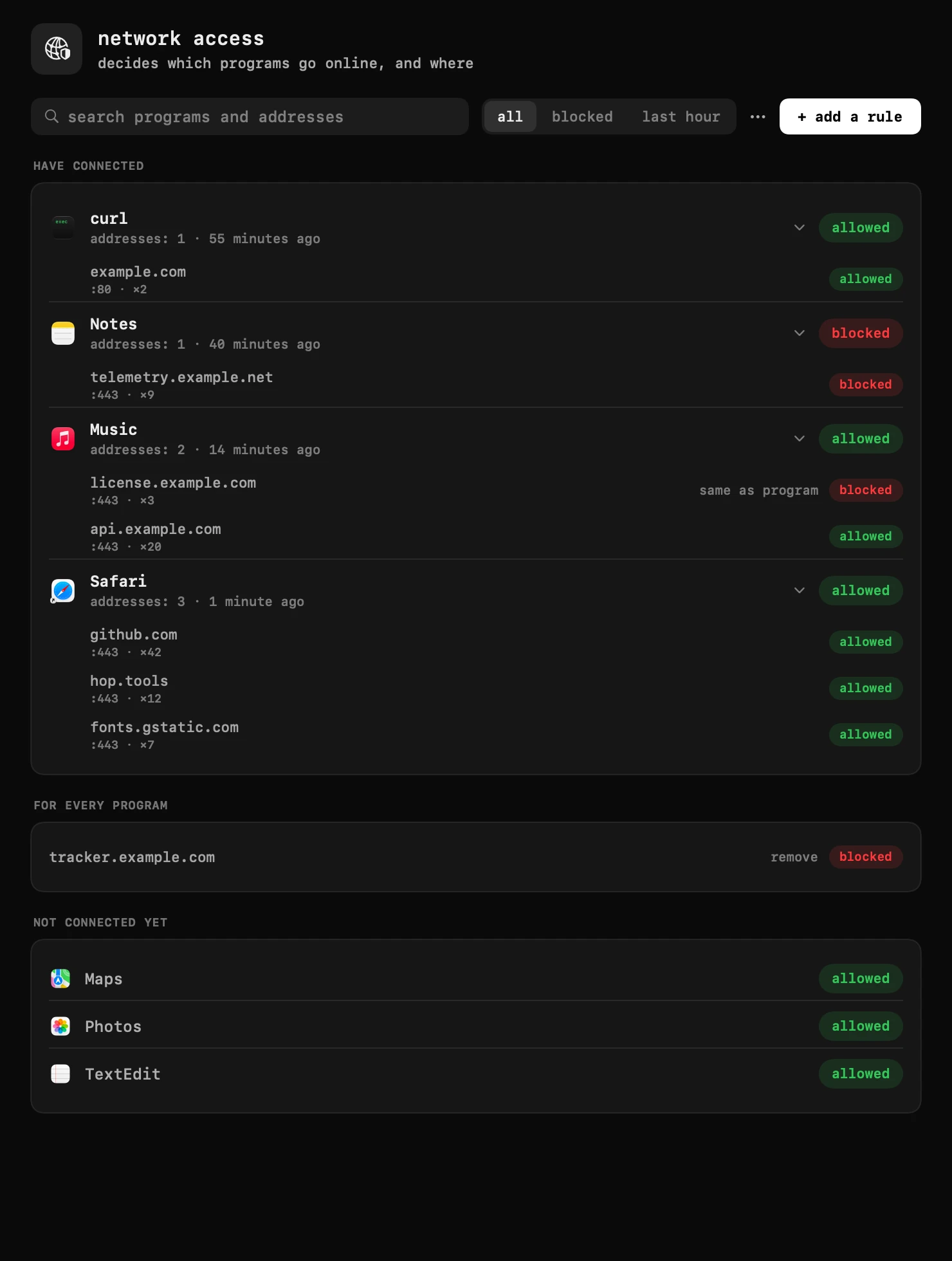
- allowed or blocked – the label beside a program says what happens to it; a click turns it over and cuts the whole program off the network, or lets it back. open a program to see its addresses: each has a label of its own, so one server can be blocked, say a license check, while the rest of the traffic goes through. an address rule wins over the program's label, and “same as program” hands the address back to it.
- the sections – “have connected” lists the programs that went online, “for every program” holds the addresses blocked for all of them, and “not connected yet” lists the other installed apps, so one can be blocked before it ever goes online. a row stays where it is when you change it, and programs that go online later come in at the bottom.
- sorting – the ⋯ menu orders the programs by when they appeared, by name, or recent first.
- add a rule – set a rule before the program ever connects: pick it from the list or from the applications folder, type an address, or leave the address empty for the whole program.
- questions – with “ask about new connections” on in the module's settings, a card at the top right asks about a connection no rule covers: block or allow, for that address or for every address of the program. it is off by default.
- rules from a file – the ⋯ menu loads a list of addresses (one per line, or a hosts file) and blocks them for every program; a line can also name a program:
com.example.app license.example.com. the same menu saves your rules to a file. - on and off – the module is on by default. turned off in the settings, it stops the filter: your blocks stop working and the internet stays on. turned back on, the same rules apply again.
- the first time, macOS asks you to allow hop's network filter in system settings. if the filter ever stops, the internet keeps working: nothing is blocked until it is back.
- the limit – hop blocks a whole server, not one page on it: inside an encrypted connection nothing is visible, and hop decrypts nothing.
settings
- ask about new connections
- a connection no rule covers waits for your answer at the top right of the screen, up to 30 seconds; with no answer it goes through