file converter for Mac
updated · by Anton Shakirov
your Mac already converts more than most people think, and for free. what matters is where that stops, because the two places it stops are the two places people end up on an upload-and-hope website. hop converts on the machine, shows the size before it starts, and leaves the original alone.
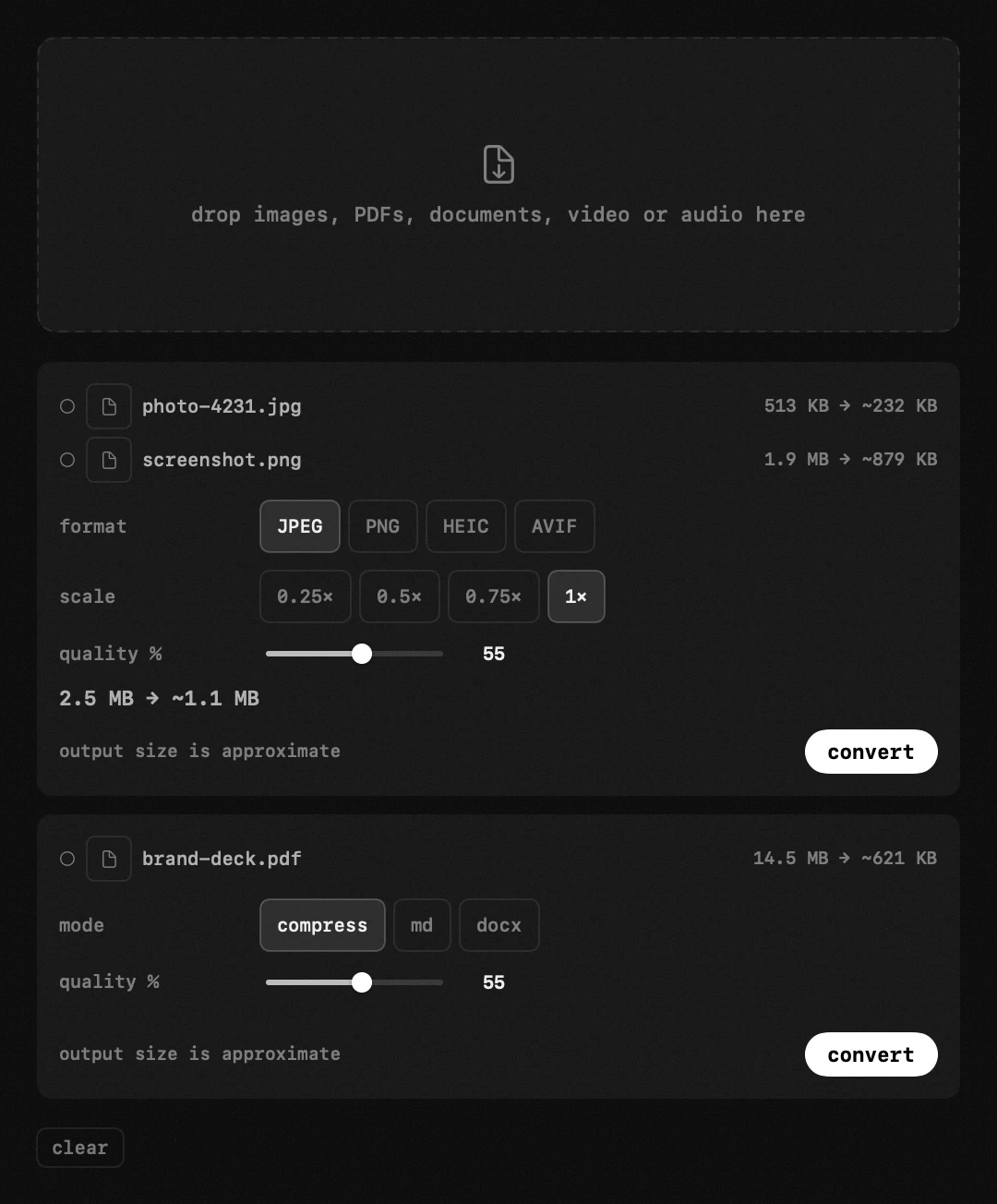
| what it is | file converter inside hop, a menu bar app for macOS |
|---|---|
| price | free — no trial, no pro tier, no account |
| licence | MIT, source on GitHub |
| requires | macOS 14 or later, Apple silicon or Intel |
| works offline | yes |
| data sent anywhere | none |
what this file converter takes, and what comes back
- images — jpeg, png, heic, avif and webp
- video — including mkv and webm, which macOS itself will not open
- audio
- documents — markdown, Word files and pdfs turn into one another
- Pages, Numbers and Keynote come out as pdf, docx, xlsx or pptx
- web pages, live or saved
drag in one file or a folder full, pick what you want out the other side, and the results land beside the originals as copies.
the most common job on that list has a free answer built into Finder: convert heic to jpg on Mac
what your Mac converts without any converter at all
select any number of images in Finder, right-click, Quick Actions, Convert Image. pick a format, press the button, and copies appear beside the originals. it runs on the whole selection at once, and for a folder of photos a form wants as jpeg it is the end of the story.
Apple documents it in a single line of the Finder help, which is a fair part of why so few people know it is there: convert an image to another format on Mac
the four built-in routes, and what each one writes
there are four: the Quick Action in Finder, Preview's export menu, sips in Terminal, and Shortcuts. they look like four products with four lists of formats. underneath they are one framework, Image I/O, and they all write exactly the same set.
on macOS 26.6.2 that set is 22 types. the everyday half of it is jpeg, png, gif, tiff, heic, avif, bmp, ico and pdf. avif is in there, which surprises people: the system writes it, just not from the Finder menu.
the list is not a secret, just not written anywhere a person would look — any app can ask Image I/O for it: CGImageDestinationCopyTypeIdentifiers
the one thing none of them writes
webp is not on that list. not in Preview, not in the Quick Action, not in sips, not in Shortcuts, because it is not in the framework all four sit on. your Mac reads webp perfectly well and cannot produce one.
asked directly, sips does not soften it: «Error: Can't write format: org.webmproject.webp», error 13, and no file where you asked for one. of the formats a web form actually asks for, that is the only one macOS has no route to.
people find this out one at a time, halfway through a job, and the question keeps landing in the same place: Preview support for webp images — Apple Community
the mirror image of that gap is the format your own phone writes: why your photos are heic
video: what avconvert does, and where it stops
there is a converter hidden in the system for video too: avconvert, in Terminal, with the passthrough preset. it changes the container and copies the picture and sound across untouched. a 56 mb mov came out as a 56 mb mp4 in two seconds. for a mov a website has refused, that really is the correct answer.
it stops at the door, though. AVFoundation knows 104 media types and Matroska is not one of them, so an mkv is not a hard file for your Mac, it is an unknown one. no preset helps, because nothing gets far enough to read it.
the list of containers the system opens is published, and it explains every «the file is fine, QuickTime just will not have it»: AVURLAsset.audiovisualTypes
the Terminal recipe, with the codec check that decides whether you need to convert at all: convert mov to mp4 without re-encoding
pdf: one filter, and no dial on it
Preview shrinks a pdf through a Quartz filter called Reduce File Size, and there is exactly one of it. its settings are fixed inside the file: jpeg quality 0.7, images resampled to 144 dpi, nothing over 2400 pixels. that is the whole of macOS pdf compression: no level to move, and no number until after you save.
which is why it sometimes returns a file larger than the one you gave it, and why «compress it again» does nothing. sips is not the way round either: it flattened a three-page document into one page on the way through.
what to do when that fixed filter overshoots or undershoots the limit you were given: compress a pdf on Mac
so which file converter do you actually need
for a batch of photos into jpeg or png, none. the Finder menu is faster than downloading anything, and anyone selling an app for that job is selling a menu item you already own.
the simple case ends at one of two edges: the format you need is one macOS cannot write, or the size matters and you need it before you commit rather than after.
| what you have | the built-in route | with hop |
|---|---|---|
| a few heic photos a form wants as jpeg | Finder → Quick Actions → Convert Image, about fifteen seconds | not needed — use the menu |
| an upload form that asks for webp | no route writes it: not Preview, not sips, not Shortcuts | webp comes out like any other format |
| a mov a website refused | avconvert with the passthrough preset, once you know it exists | the same repack, by dragging the file in |
| an mkv that will not open | the container is unknown to the system; nothing built in reads it | repacked into mp4, picture copied across untouched |
| a 40 mb pdf and a form that takes 10 | one fixed filter, and the size only after you save | a level you set, and the size shown before you start |
| a folder of clips for reels | look up the dimensions and the bitrate, then repeat per clip | one button per platform, the whole folder at once |
how hop converts the files macOS will not
those two gaps are what hop is built around. webp goes out as easily as jpeg or png, and mkv and webm are repacked into mp4 by a small helper that downloads once — the picture copied across untouched, so nothing is re-encoded and the file finally plays.
a folder full goes in at once and the promise comes before the work: hop encodes a sample first, so the size on the dial is a measurement rather than a guess, and you decide with the number in front of you. what comes out lands next to the original, which is left exactly as it was.
every format, the helper that repacks mkv, and where each control sits — the handbook end of this, in your own language: the converter in the guide
the long version of the mkv case, and what a remux cannot fix: open an mkv file on Mac
the size you were promised is the size you get
most converters ask for a quality level and let you find out afterwards what it cost. hop runs a sample through first and shows the resulting size before you commit, so trimming an attachment down to what an email will accept stops being guesswork.
compression has a level you set. push it and watch the promised number move. images, pdfs, video and audio all go through the same dial.
video for the place it is going
vertical for reels and shorts, square for a feed, wide for YouTube. one button sets the frame, the resolution and the compression together, and shows the bitrate it means, so you are not looking up recommended dimensions again.
a picture of the wrong shape is cropped, given bars, or laid over a blurred copy of itself — whichever you choose. it is never stretched, because stretched video looks like a mistake and cannot be undone.
what those numbers do to a clip once a platform re-encodes it at the other end: compress video for reels and shorts
documents and web pages come out the other side too
markdown becomes a pdf laid out by hop itself. Word files — .docx, .doc and .rtf — become pdf or markdown, and a pdf gives its text back as markdown, a scanned page read with Apple's Vision on the way. no office suite, nothing to download.
Pages, Numbers and Keynote are exported in batches by the apps that own them, which is why the layout survives. a web page works the same way: paste an address or drop a saved page, and it comes back as pdf, docx, markdown, rtf or plain text.
the batch case has a page of its own, including the Automator recipe that stalls: convert Word documents to pdf in batch
and if what arrived is wrapped around a document rather than being one: archive manager for Mac
nothing is uploaded
conversion happens on your Mac. no file leaves the machine, no server sees a contract or a family photo, and it all works with the Wi-Fi off.
for anything you would not want sitting in a stranger's temporary folder, that is the whole argument.
frequently asked questions
- can it convert an image to webp?
- yes. it is the one format macOS has no built-in route to at all — Preview, the Finder Quick Action, sips and Shortcuts all read webp and none of them can write it.
- does anything get uploaded to a server?
- no. everything happens on your Mac and works with no connection at all.
- are my original files changed?
- never. the result lands next to the original as a copy, and the original is left exactly as it was.
- can it convert several files at once?
- yes. drop in as many as you like and they go through together.
- why will mkv not play on my Mac?
- macOS does not know the container — Matroska is not among the media types AVFoundation opens, so the file is not damaged, it is unrecognised. hop repacks it into mp4 and copies the picture across untouched, so nothing is re-encoded and nothing is lost.
- can it shrink a pdf for email?
- yes — pdfs, images, video and audio all compress, and you see the resulting size before you commit.
- why is my pdf still too big after using Preview?
- Preview has one compression filter and its settings are fixed: quality 0.7, images resampled to 144 dpi, nothing over 2400 pixels. running it twice changes nothing, because the second pass has nothing left to take. a level you can move is the way past that.
other tools in hop
- app uninstallerremove an app together with what it left in about thirty places.
- timerwork-rest cycles that survive a sleeping Mac.
- app launcherthe apps you open all day, one click away.
what people do with this
- a folder of heic, and something that wants jpg
- mov and mp4 are often the same file
- QuickTime will not open it. the video is fine.
- the pdf is 40 mb and the form accepts 10
- forty documents, and Word is not installed
- a folder of .pages files, and the person asking for them has Word
- the pdf came out with the hashes still in it
- the clip is fine. the upload made it look terrible.
what people pay for this
| app | price | what you get instead |
|---|---|---|
| Permute | $14.99 one-time | convert offline, see the size before you commit, keep Intel support. |
| HandBrake | free, open source | a transcoder rebuilds the picture. sometimes the box is all that is wrong. |
| hop | free, MIT | images, video, audio and documents. offline, with the size shown up front. |
prices checked at the vendor's own page on 2 september 2026
about the author

Anton Shakirovmakes hop
makes hop and every page on this site. twenty tools under a single menu bar icon, MIT licensed and open source. reads and answers issues and email himself.