file converter
updated
Drop a batch of images, PDFs, videos or audio onto the panel: JPEG, PNG, HEIC, AVIF and WebP out; PDF compression; HEVC video shrinking with a live, honest size estimate before you convert. Everything is processed locally. Video can also be reframed as it converts – 9:16, 4:5, square or 16:9, cropped to fill, padded, or laid over a blurred copy of itself – and the squeeze has a level of its own, so the size promised before you convert is the size you get.
One button sets a clip up for where it is going – reels, feed, tiktok, shorts or youtube – writing the frame, the resolution and the squeeze from what the platform itself recommends, with the resulting bitrate shown beside the dial. MKV and WebM are repacked into MP4 first (macOS opens neither) by a small helper that downloads once. Pages, Numbers and Keynote documents are exported in batches by the apps themselves – PDF, or docx, xlsx and pptx.
Web pages convert too: paste an address or drop a saved page, and it comes out as PDF, docx, Markdown, RTF or plain text.
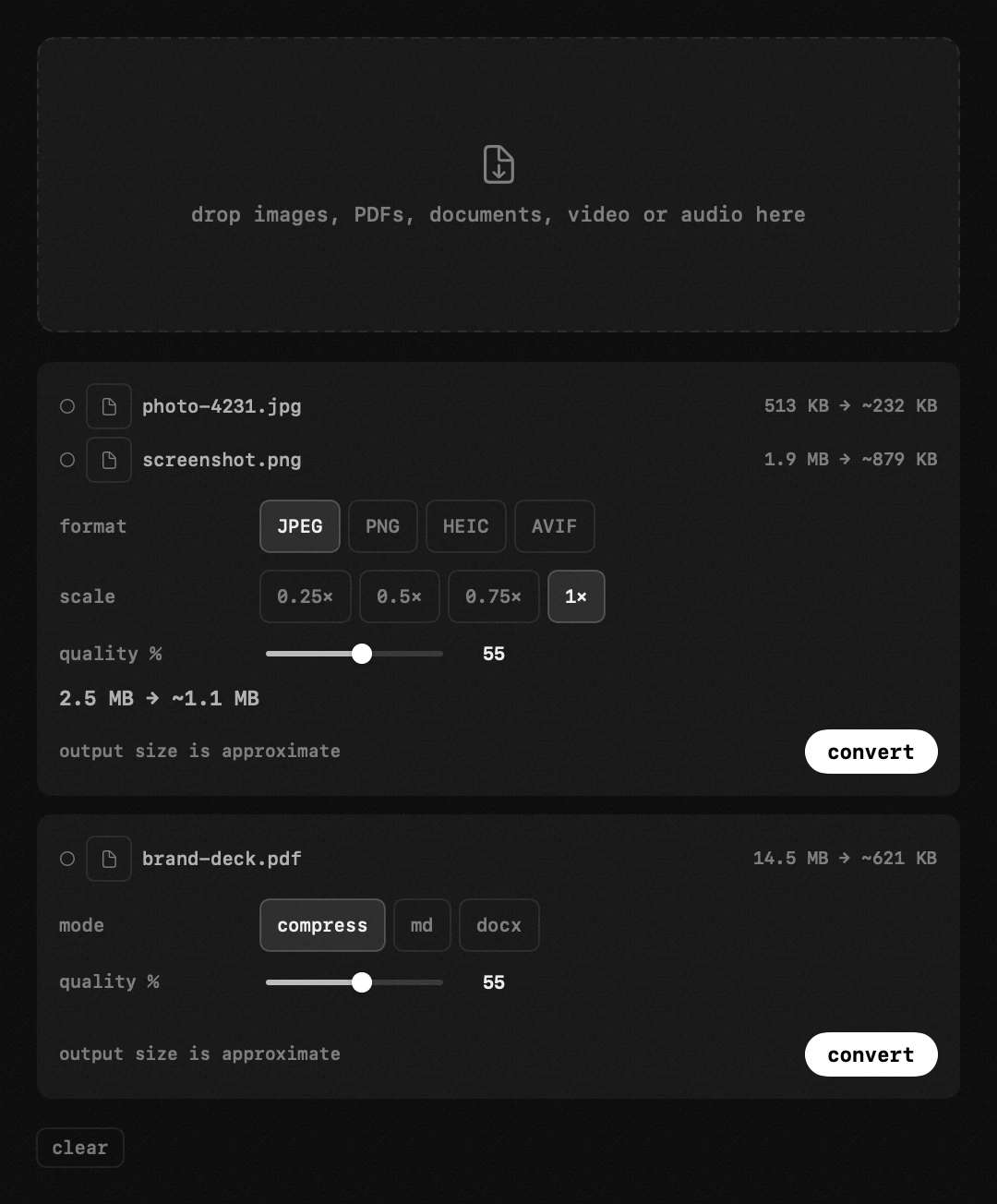
images – JPEG, PNG, HEIC, TIFF, GIF and RAW in; JPEG / PNG / HEIC out, plus AVIF for the web. format, scale and quality are adjustable.
PDF – compression by redrawing pages (~150 dpi): files shrink severalfold, but the pages become pictures – text can no longer be selected or copied. controlled by quality.
video – MP4, MOV, M4V in; MP4 or MOV out at original / 1080p / 720p / 540p. the container stays as it came, an mp4 leaves an mp4, and a small video is never blown up into a bigger one.
frame – a clip can be reshaped for wherever it is going: 9:16 for reels and stories, 4:5 or 1:1 for a feed, 16:9 for everything else. footage of another shape is cropped to the middle, fitted with bars, or laid over a blurred copy of itself – crop, bars or blur, whichever you pick.
compression – a dial from 1 to 100 sets the bitrate hop encodes with, so squeezing a video really does make it smaller. the size promised before the run is arithmetic, bitrate times duration, and lands within a few percent of the file you get.
audio – MP3, WAV, FLAC, AAC → M4A (AAC). the system has no MP3 encoder, so nothing comes out as MP3.
for – one button sets a clip up for where it is posted: the frame, 1080 across the short side, and the squeeze the platform itself recommends at 1080p30 (5 Mbps for reels and feed posts, 8 for youtube, shorts and tiktok). change any of those three and the button unlights – it stores nothing of its own.
MKV and WebM – macOS opens neither, so hop repacks them into MP4 first: the picture is copied across untouched, which takes a second, and everything above then applies as to any mp4. a small helper downloads once for that. a webm whose video is vp8 cannot go into MP4 at all, and says so instead of quietly re-encoding.
iWork – pages, numbers and keynote documents are exported by pages, numbers and keynote themselves: to pdf, or to each one's own office format (docx, xlsx, pptx). the application has to be installed and macOS asks for permission at the first export; a file whose application is missing simply fails while the rest of the batch carries on. what comes out is exactly what «export to…» in that app produces – formulas included.
documents – MD, DOCX, DOC, RTF and TXT in; PDF, MD or DOCX out.
the size estimate is honest: for images and PDFs the first file is trial-converted; for video and audio it's calculated from duration and bitrate.
everything is local, files never leave the Mac. results go to Downloads, next to the original or a custom folder – originals stay untouched.
- file rows – thumbnail, name and each file's own «now → after» size, and a video row says what it is becoming, «718p → 404p»; the circle turns into a green check when done. the bar moves with the bytes actually written rather than in jumps, a sound says the batch is finished, and «reveal in Finder» opens the folder with the file already selected.
- ↗ – the converter row in the panel opens this window; the queue survives closing it.
documents – markdown, word files and pdfs turned into one another, in the same window and the same batch.
- md → pdf – laid out by Hop itself: headings, lists, quotes, code blocks and links, on A4 pages with proper margins. the markdown engine is ours, so the result looks deliberate rather than like a browser printout.
- word → pdf or md – .docx, .doc and .rtf: text, headings, emphasis, lists, simple tables and images come across. columns, footnotes and headers do not: those are layout, and the conversion is honest about losing them.
- pdf → md / docx – switch the pdf group to md. a pdf stores layout rather than structure, so this is text EXTRACTION with heading guesses: a text-first document comes out well, a magazine spread comes out as prose. a scanned page with no text layer is read with Vision, the same engine the text recognition module uses.
- md → docx – for when a document has to arrive in a shape Word will open. links become plain text there: the system's own word writer has nowhere to keep the address.
- offline – everything is native: no converter service, no bundled office suite, nothing to download.
settings
- hide files once converted
- save toDownloads · next to original