an archive manager for the part your Mac leaves out
updated · by Anton Shakirov
the pages selling you one of these open the same way: macOS cannot handle rar or 7z. half of that is wrong. a .7z opens on a double click with nothing installed, and most rar files unpack from a Terminal window using code already on your disk. what your Mac will not do is give rar a double click — and it stops dead on the archives people actually send. that gap is what this module is for.
| what it is | archives inside hop, a menu bar app for macOS |
|---|---|
| price | free — no trial, no pro tier, no account |
| licence | MIT, source on GitHub |
| requires | macOS 14 or later, Apple silicon or Intel |
| works offline | yes |
| data sent anywhere | none |
what a Mac already does without an archive manager
Archive Utility is built in and has no window of its own: it runs when you double-click something it recognises, unpacks beside the original and quits. zip is the obvious one — and the same app makes them, from «Compress» in the Finder's right-click menu.
Apple documents the zip half of this and stops there, which is a fair part of why the rest gets reported so badly: zip and unzip files and folders on Mac
the two formats get grouped together everywhere and should not be — your Mac handles one and refuses the other. the full walk through both routes, with the commands: how to open a rar file on a Mac
does macOS open 7z natively?
yes, and it has for years. Archive Utility declares the 7-zip type and the system lists it as the default application for it — the claim is visible in the Launch Services database. a .7z opens on a double click with nothing installed.
the command line goes further. macOS ships bsdtar, and its manual page lists 7-zip in both directions — it reads the format and writes it. tar, tar.gz, tar.bz2, tar.xz and gz are handled the same way.
does the Terminal open rar?
mostly, and almost nobody selling an archive manager mentions it. bsdtar is built on libarchive, and libarchive reads rar — so `tar -xf archive.rar` unpacks a great many of them with nothing installed.
the support is documented as partial, and the limits are the point: RARv3 archives read, including self-extracting ones. solid archives — what WinRAR makes by default on a large folder — do not, and neither do encrypted ones. it stops and says so rather than leaving a broken folder.
the exact scope is in the manual page that ships with your Mac, `man 5 libarchive-formats`, and in the project's table: libarchive: formats read and written
what none of this gives you is a double click. there is no Finder handler for rar, so the file has no icon of its own and opens in a text editor if you insist.
so do you need an archive manager on a Mac?
for a zip or a 7z, no — you already have one, and it is quieter than anything you could install. the simple case stops being simple at two points: when the file is a rar, and when it is a rar that `tar` refuses. everything below is about those two.
one quirk catches people on either route: a zip made on a Mac carries a folder of Apple metadata that confuses everyone opening it on Windows — what __MACOSX in a zip is
| what you've got | the built-in route | with hop |
|---|---|---|
| a zip or a 7z from a download page | double click — Archive Utility takes both | not needed, keep the double click |
| one rar, and a Terminal window is no trouble | `tar -xf archive.rar` unpacks most of them | same result from a drop, if you would rather not type |
| rar files turn up every other week | every one of them is a trip to the Terminal | let hop take rar in Finder — a double click unpacks it beside itself |
| a rar someone packed from a big folder with WinRAR | solid archives are outside libarchive's rar support; it stops and says so | hop fetches a signature-verified rar helper rather than leaning on the system library |
| a folder to send someone who wants one attachment | right-click, «Compress» — a zip, and only a zip | same window, other way round — drop the folder, press the button |
formats this archive manager handles
- zip
- rar — the one that stops a double click cold
- 7z
- tar, tar.gz, tar.bz2 and tar.xz
- gz
deliberately the formats that turn up in real life, not a catalogue of everything that ever existed. two things worth knowing: rar and 7z fetch a small signature-verified helper — about 6 mb — the first time one turns up, so the app stays small for people who never meet those formats. and hop unpacks rar but never creates it.
a password-protected archive is not on that list either way. the sibling module does the neighbouring job — turning one format into another rather than bundling several: the file converter
how to open a rar file on a Mac with hop
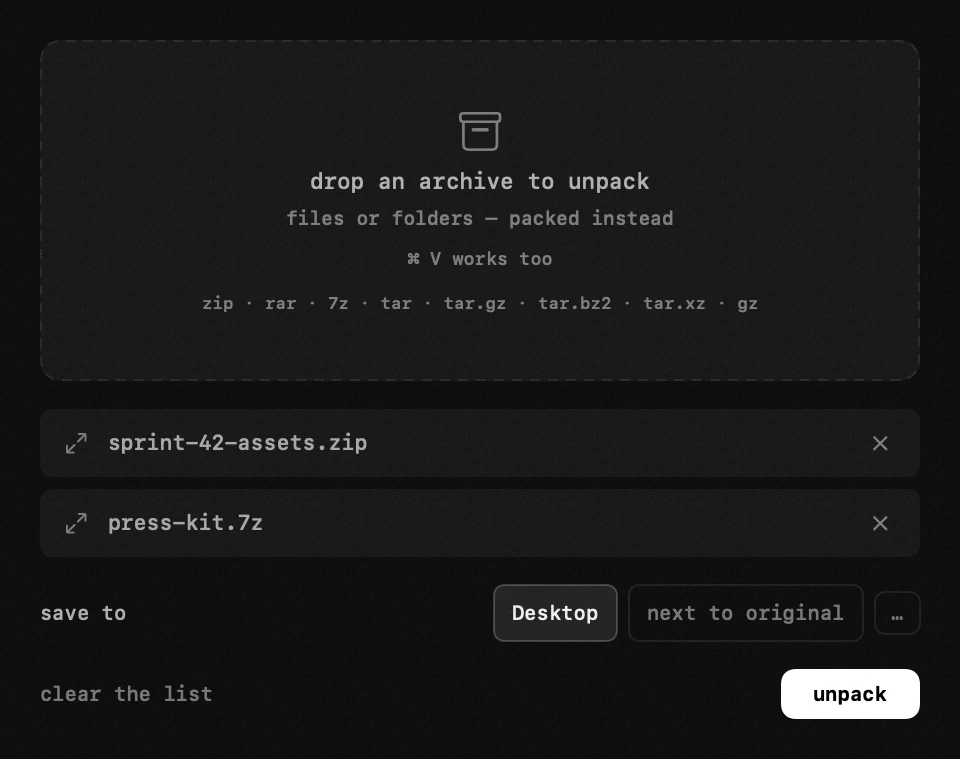
an archive dropped into the window sits there until you press the button: you pick where it should land — the Desktop, next to the original, any folder — and a stray drop costs you nothing, because nothing has happened yet. the files appear where you asked and the archive stays where it was.
the formats, the Finder default and what each control does — the handbook end of this, in your own language: archives in the guide
unpacking straight from Finder
you can also let hop open archives from Finder, and this is the part that removes the detour: a double click unpacks the file beside itself, in a small progress window of its own.
in practice it applies to rar and only rar. the setting offers the format when no Apple app owns it, and can take it back from a manager you installed once and forgot — zip, 7z and the native formats stay with Archive Utility, which macOS does not hand over. the card shows the real state, so it cannot claim a default Finder has given away.
the module also works with its row hidden from the panel, so if that one double click is all you wanted, nothing has to sit in your way.
packing files back into an archive
drop ordinary files instead of an archive and the same window packs them into one — the everyday case of sending a folder to someone who does not want fourteen attachments. rar is the exception: opened, never created.
that is a licence, not a missing feature — the format's terms forbid using its source to re-create the compressor, which is why no honest tool on any platform offers it: the unrar licence
nothing runs until you say so
an archive from a stranger is not a thing you want opening itself. dropping a file into hop starts nothing: the window shows what it is holding and waits for the button.
everything happens locally. no file is uploaded and it works with the Wi-Fi off — the whole difference from the web unpackers ranking alongside this page. those do the job, and the price is that your archive is opened on somebody else's machine.
the .dmg files you collect installing any of this are not archives at all — they are disk images, never cleaned up, and a routine double-digit share of a full disk: what «system data» is actually using
where this archive manager stops
archives it will not open
- password-protected archives — not something this module promises, in either direction.
- multi-part sets: part1.rar, part2.rar, or .z01 and .z02 beside a .zip. open the first part with the rest in the same folder — part two alone fails whatever you use.
- a truncated download. an archive that stops mid-file reports damage rather than a missing format — check the size against what the page promised.
- iso, rpm, lha and the long tail. dedicated managers list forty formats; this one lists eight — the eight you meet.
if archives are a daily job rather than a fortnightly annoyance, a dedicated tool is the honest answer, and we say so on its own page: hop compared with Keka
the case this module is built for is the other one: a rar turns up now and again, and you would rather not keep an app around for it — especially when the same icon already holds eighteen other tools.
and if a manager you installed years ago still holds your archives, taking it out properly is its own small job: uninstall an app with its leftovers
frequently asked questions
- does macOS have a built-in archive manager?
- yes — Archive Utility. no window, no icon in your Applications folder, which is why people miss it: it runs on a double click, unpacks beside the original and quits. zip, 7z, tar and gz all go through it.
- does macOS open 7z natively?
- yes. Archive Utility declares the 7-zip type and the system lists it as the default, so a .7z opens on a double click with nothing installed. most pages ranking for this question still say otherwise.
- why can't my Mac open rar files?
- there is no handler for the type. rar is proprietary, and while the code to read it sits in the system libraries, nothing in the Finder claims the file — so a double click hands it to a text editor rather than reporting an error.
- can it open rar files?
- yes — rar, 7z, zip, tar, tar.gz, tar.bz2, tar.xz and gz. rar is the one macOS gives no double click, and the reason most people go looking for an archive manager at all.
- can it create archives too?
- yes — drop ordinary files instead of an archive and it packs them. the exception is rar, which it opens but cannot create: the format's licence forbids re-creating the compressor.
- can i unpack straight from Finder?
- yes. let hop open archives, and a double click unpacks the file beside itself in a small progress window. it takes rar only when no Apple app owns it — zip, 7z and the native formats stay with Archive Utility.
- will it take over my zip files?
- not unless you ask, and it will not offer to. the default-app setting covers rar, and the card shows the real state — it cannot claim a default Finder has given away.
- does anything get uploaded?
- no. unpacking and packing happen on your Mac, and both work with no connection — unlike the web unpackers, where the archive is opened on somebody else's server.
other tools in hop
- keyboard lockwipe the keyboard clean without shutting the Mac down.
- vpn switcherevery vpn your Mac knows about, one switch each.
- clipboard historyeverything you copied — text, links, screenshots and whole files.
what people do with this
what people pay for this
| app | price | what you get instead |
|---|---|---|
| Keka | free from the site, $6.49 on the App Store | the rar-shaped hole in Finder, without a second archiver. |
| The Unarchiver | free | opens archives and packs them back up, which The Unarchiver does not. |
| hop | free, MIT | zip, rar, 7z and the rest — unpacked right where you are looking. |
prices checked at the vendor's own page on 2 september 2026
about the author

Anton Shakirovmakes hop
makes hop and every page on this site. twenty tools under a single menu bar icon, MIT licensed and open source. reads and answers issues and email himself.