file archives
updated
The module's row opens a window, and that window is where you drop things – ⌘V works too, several files at once. What you add waits in a list until you press the button: archives are unpacked, anything else is packed into one archive. Results land on the Desktop by default, or next to the original, or in any folder you choose. zip, rar, 7z, tar, tar.gz, tar.bz2, tar.xz and gz are covered; rar and 7z fetch a small signature-verified helper (~6 MB) the first time one turns up. Hop unpacks rar but never creates it – the format is proprietary. "Hop as the default for archives" in settings offers only rar when no Apple app owns it, and can take rar back from third-party apps; zip, 7z and the native formats stay with Archive Utility. It works with the module hidden, and the card shows the real state, so it can never claim a default Finder has given away. Double-clicking an archive in Finder unpacks it right beside the file, in a small progress window of its own, and a failed job leaves nothing hidden behind. Files Hop opens carry its own icon with the format written across it, so a folder of them reads at a glance.
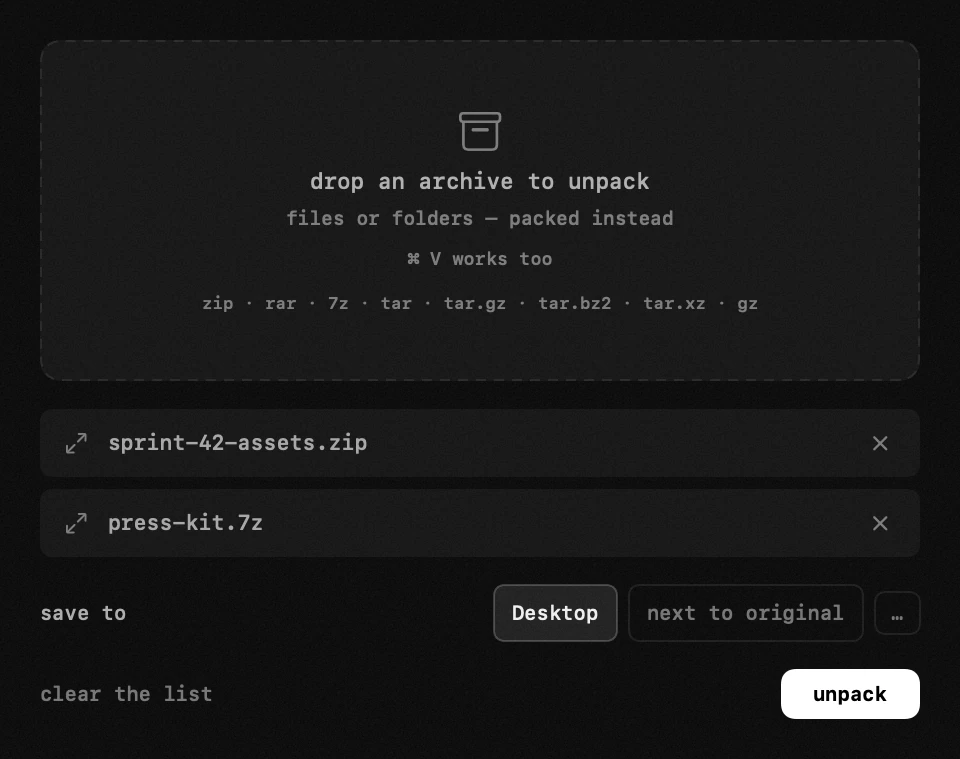
- the window – the module's row opens it, and that is where you drop things: a panel closes the moment a drag starts, so it could never hold a drop target. ⌘ V works too, several files at once – copy them in Finder and paste them here.
- the list and the button – everything you add is listed, and nothing happens until you press unpack (or pack). archives in the list are unpacked; anything else is packed into ONE archive, so a mixed set packs.
- where it lands – the Desktop by default, because a result has to appear where you are already looking. next to the original, or any folder you choose, is one click away in the same window.
- formats – zip, rar, 7z, tar, tar.gz, tar.bz2, tar.xz and gz. rar and 7z fetch the 7-Zip helper (~6 MB) the first time one turns up, installed only after its signature checks out. Hop unpacks rar but never creates it: the format is proprietary.
- packing format – zip, tar.gz or 7z, offered only when the list is going to be packed: an archive being opened comes out as whatever it already is. an existing name is never overwritten; the new one is numbered the way Finder does it, and several loose files come out inside one folder named after the archive.
- opening from Finder – only rar can be assigned to Hop in settings → other modules, and never while an Apple app already owns it. Finder-opened archives unpack beside themselves, regardless of the window's destination setting. A successful double-click stays out of the way; the archive window opens only if the job fails. Earlier associations can be returned to Archive Utility from the same settings section.
settings
- open rar files with Hop by default