color picker for Mac
updated · by Anton Shakirov
you need the hex of a colour you can see but cannot reach — in a photo, in someone else's app, in a screenshot pasted into a chat. macOS has an eyedropper already, and for one careful measurement nothing beats it. this page is about the other case: several colours, three notations, and not losing the one you took a minute ago.
| what it is | color picker inside hop, a menu bar app for macOS |
|---|---|
| price | free — no trial, no pro tier, no account |
| licence | MIT, source on GitHub |
| requires | macOS 14 or later, Apple silicon or Intel |
| works offline | yes |
| data sent anywhere | none |
how to pick a color off your Mac screen
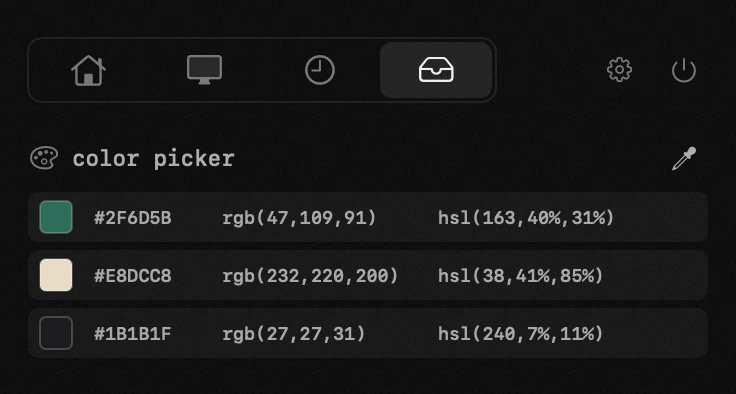
one shortcut brings macOS's own loupe under the cursor, and the pixel you click is on the clipboard before you have decided what to do with it. the difference from the system eyedropper starts at the second colour: each one joins a list in the order you took it, with hex, rgb and hsl side by side on its row, so a palette lifted off a screenshot survives the walk back to the editor.
the shortcut, the length of the list, and why a colour clicked twice does not reshuffle the rows — the handbook end of this, in your own language: the colour picker in the guide
the order never changes under the cursor, so the row you are aiming at is the row you get. the length of the list and how many rows show at once are settings.
if you want one hex value and an explanation of why it comes out different from the design file, that has a page of its own: get the hex code of a colour on screen
what macOS already gives you
macOS ships Digital Color Meter, in Applications → Utilities. it is not a stripped-down freebie: on a single measurement it is more capable than most of what sells itself as a Mac colour picker.
what the meter does that almost nothing else does
- eight colour spaces to report in — sRGB, Display P3, Adobe RGB, BT.2020, L*a*b*, and three flavours of your display's native values including EDR
- four number formats — decimal, hexadecimal, percentage and float
- an aperture slider, so a reading can be one pixel or an average of a noisy patch
- magnification from 1x to 8x, which is how you land on a one-pixel border
- position locking on either axis, for when the thing you are measuring is a thin line
the two settings people mix up are kept apart in Apple's own wording: the format is «choose View > Display Values», the space is «click the pop-up menu, then choose a color space». one is a menu, the other a pop-up inside the window: Digital Color Meter User Guide, Apple Support
so if the job is one colour, measured exactly, in a space you can name, open the meter. that is the tool, and this page is not going to pretend otherwise.
where the meter stops
it shows one reading, and forgets it the moment the cursor moves. six colours off a screenshot means six round trips and somewhere to write them down, and the writing-down is where the mistakes come from.
it also has no hsl. the four formats are all ways of writing the same rgb triple; hsl is a different model, so if that is what your stylesheet wants, you convert it by hand.
which one you actually want
one colour, once, and it has to be right: the meter, every time. the simple case ends at the second colour — and at the moment you need the same value written two different ways.
behind the choice sits a second question — whether this is worth a permanent menu bar icon of its own. on a notched MacBook that space runs out sooner than people expect: menu bar icons behind the notch
how this color picker compares
| what you are doing | Digital Color Meter | with hop |
|---|---|---|
| one colour, and it must be right in a named space | wins outright — pick the space in the window, hexadecimal in the View menu, ⇧⌘C | not the tool for this; open the meter |
| six colours off a screenshot into a palette | one reading at a time, gone when the cursor moves — six trips and a notepad | six clicks, six rows, kept in the order you picked |
| the stylesheet wants hsl | no hsl at all; convert the rgb by hand | hsl is a button on the row, next to hex and rgb |
| hex now, the same colour as rgb ten minutes later | change the format setting and measure it again | both are already on that row; click the other one |
| the shade from an hour ago, when the conversation comes back | long gone | still in the list, and in the clipboard history with everything else |
| reaching for a picker from the App Store instead | n/a — the meter is Apple's and asks for nothing | no screen recording prompt either; the system loupe hands back one colour |
three notations, no conversion
every row carries hex, rgb and hsl together. you do not pick a format up front and you do not convert afterwards — the one you need is one click away, whichever it turns out to be.
the format you want is rarely the format you wanted when you took the reading: the value goes into css as hex, into a design tool as rgb, and into a lightness tweak as hsl — three trips through a converter if the picker kept only one.
picked colours land in the clipboard history along with everything else you copy, so a shade from twenty minutes ago is still there when the design conversation comes back around: clipboard history
a color picker that asks for no screen recording
worth reading before you install anything from the App Store. a picker that reads the screen needs the screen recording permission, and macOS grants that per app, not per pixel: an app holding it can watch everything you do, for as long as it runs.
an app of this class asking to record your screen for the sake of an eyedropper is asking for far more than the job needs.
hop does not ask for it. the picker uses the system loupe, and macOS hands back a single colour rather than the screen — the dialogue never appears because the permission is not needed. Digital Color Meter does not ask either, for the same reason: this is a line against third-party pickers, not against Apple's utility.
the mechanism is Apple's own sampler, which returns one colour to the app that called it and nothing else: NSColorSampler, Apple Developer Documentation
if you have already granted screen recording to something and macOS keeps bringing the prompt back, that has its own explanation: the screen recording permission that keeps coming back
it works over anything on screen
- a website in any browser
- a photo, in Photos or anywhere else
- another app's window — a design tool, a video, a pdf
- a screenshot someone pasted into a chat
the same idea applied to words rather than pixels: text recognition
when the color is not the one you expected
the hex does not match the design file
not the picker's fault. on a wide-gamut Mac the panel is closer to Display P3 than to sRGB, and the same pixel written in those two spaces gives two different hex values — far enough apart to see, too far apart to be rounding. the meter is the tool that can answer in a space you name; anything reading the screen answers in what the screen is doing.
the other half of the mismatch sits in the design tool: Figma starts new files in sRGB, and switching a file to P3 either preserves the numbers or preserves the appearance — not both: colour profiles in Figma design files, Figma Help Center
the shade shifts through the day
Night Shift and True Tone both change what the panel is emitting, so a reading taken off the screen moves with the light in the room and the time of day. turn them off before measuring anything you intend to write down.
you landed on the wrong pixel
borders, anti-aliased text and gradients are one or two pixels wide, and the loupe follows the cursor rather than snapping to anything. a value that keeps landing between the two colours you can see is the blend between them — the case the meter's magnification and axis locks were built for.
and if the colour has since scrolled out of sight, the search is the one you would run for any other clipboard entry: find something you copied earlier
the picker is one of twenty tools in the same menu bar icon: everything hop does
frequently asked questions
- does a Mac color picker need screen recording permission?
- a third-party one usually does, because it reads the screen. hop does not — it uses the system loupe, which returns a single colour rather than the screen, so the permission is never requested. Digital Color Meter does not ask either.
- is there a color picker built into macOS?
- yes — Digital Color Meter, in Applications → Utilities. it reports in eight colour spaces and four number formats, which is more than most paid pickers manage. what it does not do is keep a list: it shows one reading and forgets it when the cursor moves.
- how do i show hex instead of rgb?
- in Digital Color Meter it is View → Display Values → as Hexadecimal; it opens on decimal rgb, which is why people conclude it cannot do hex. in hop every row already carries hex, and you click it.
- which formats can it copy?
- hex, rgb and hsl. every picked colour carries all three as separate buttons, so you choose the notation after taking the reading rather than before.
- can i pick several colours in a row?
- yes. each click adds a row to the list, in the order you picked them, and the list stays until you clear it. the length of the list and how many rows are visible at once are settings.
- why is the hex different from the one in my design file?
- your display is probably closer to Display P3 than to sRGB, and the same colour written in those two spaces is two different hex values. it is a colour space mismatch rather than an inaccurate reading — Digital Color Meter is the tool that can report in a space you name.
- does it work over full screen video?
- yes — the loupe sits above whatever is on screen, including video and other apps' windows.
- is it really free?
- completely. no trial and no pro tier, and the other eighteen tools come with it.
other tools in hop
- archiveszip, rar, 7z and the rest — unpacked right where you are looking.
- app uninstallerremove an app together with what it left in about thirty places.
- timerwork-rest cycles that survive a sleeping Mac.
what people do with this
what people pay for this
| app | price | what you get instead |
|---|---|---|
| ColorSlurp | free + Pro $19.99/yr | hex, rgb and hsl at once — and no screen recording permission. |
| hop | free, MIT | any pixel on screen, in hex, rgb and hsl at once. |
prices checked at the vendor's own page on 2 september 2026
about the author

Anton Shakirovmakes hop
makes hop and every page on this site. twenty tools under a single menu bar icon, MIT licensed and open source. reads and answers issues and email himself.