text recognition for Mac
updated · by Anton Shakirov
some text on your screen simply cannot be selected. a frame of a video playing in Chrome, a pdf that blocks copying, a dialog an app refuses to let you touch. hop frames any piece of the screen and hands the text back — ready to read, fix and copy.
| what it is | text recognition inside hop, a menu bar app for macOS |
|---|---|
| price | free — no trial, no pro tier, no account |
| licence | MIT, source on GitHub |
| requires | macOS 14 or later, Apple silicon or Intel |
| works offline | yes |
| data sent anywhere | none |
what text recognition reads on your screen
anything the screen can show. hop does not care whether the text lives in an image, a video or an app that disabled copying — it reads pixels, not files.
- a webinar slide, or a frame from someone's screen share on a call
- a pdf that will not let you select a single word
- a screenshot someone sent you in a chat
- an error message from an app that refuses to be copied
- a photo of a document, a receipt, a book page
- a picture you drop into the window from Finder
video is the case with the most exceptions, and it deserves its own walk-through: which players hand the text over on their own, which ones never will, and what to do about the second kind. how to copy text from a video on your Mac
what Live Text already does, and where it stops
macOS has Live Text built in, and it reaches further than most pages on this subject admit. a photo in Photos, an image on a web page, a page in Preview — you select the text the way you would in a document. it is free, it is already on your Mac, and if that covers your case you do not need anything else.
video is covered too, and has been since Ventura. pause a clip in Safari, QuickTime Player or Quick Look and the frame is analysed like a picture: the text becomes selectable. anyone still telling you a Mac cannot copy text off a paused video is three releases behind.
the behaviour has a name in Apple's own documentation: a player view «tries to find objects, text, and people when you pause media playback», and it is switched on by default from macOS 13. AVPlayerView.allowsVideoFrameAnalysis — Apple Developer
where it does not reach
the boundary falls out of that sentence: the analysis belongs to Apple's player view. software that draws its own video surface never gets it — Chrome, Firefox, VLC. neither does a window that is not a picture at all: a dialog, a licence key in an installer, a table in a tool that ships without a copy button. a screen share in a call is somebody else's pixels arriving as video, so there is nothing to select there either.
that gap is the reason this module exists. the system handles video fine on its own; what it will not do is read an arbitrary rectangle. once you are reading a rectangle, whatever drew the pixels stops mattering.
a scanned pdf sitting on disk is a different job again, and a different module: it is not on screen, and you want the whole file rather than the part you can see. the converter pulls text out of a pdf
so do you need this to extract text from an image
if the pixels belong to something Apple recognises — a photo, a pdf page, a clip paused in Safari or QuickTime — use Live Text and skip the rest of this page. the simple case ends the moment something else draws the pixels, and from there the free route stops being «select and copy» and becomes «screenshot it, open the screenshot, select and copy, delete the file».
| what you have | the free route | with hop |
|---|---|---|
| a photo, a receipt, a screenshot in Preview | Live Text: select it like text | not needed — use Live Text |
| a clip paused in Safari or QuickTime | Live Text reads the frame since Ventura | same result, no reason to switch |
| a clip paused in Chrome, Firefox or VLC | screenshot it, then Live Text the screenshot | frame the region, the text comes back |
| an error dialog you cannot select | screenshot, open it, select, delete the file | frame the dialog where it stands |
| a slide in someone's screen share | screenshot before it moves on | frame it while it is up |
| a table or a code snippet | comes back as one ribbon, you rebuild the rows | line breaks are kept |
| the same job forty times a day | forty screenshots to clean off the desktop | a shortcut and a drag |
every reading lands in the clipboard history at the same time, so the text you pulled an hour ago is still there without you having pasted it anywhere to keep it. how the clipboard history works
how to extract text from an image on your Mac
frame a piece of the screen
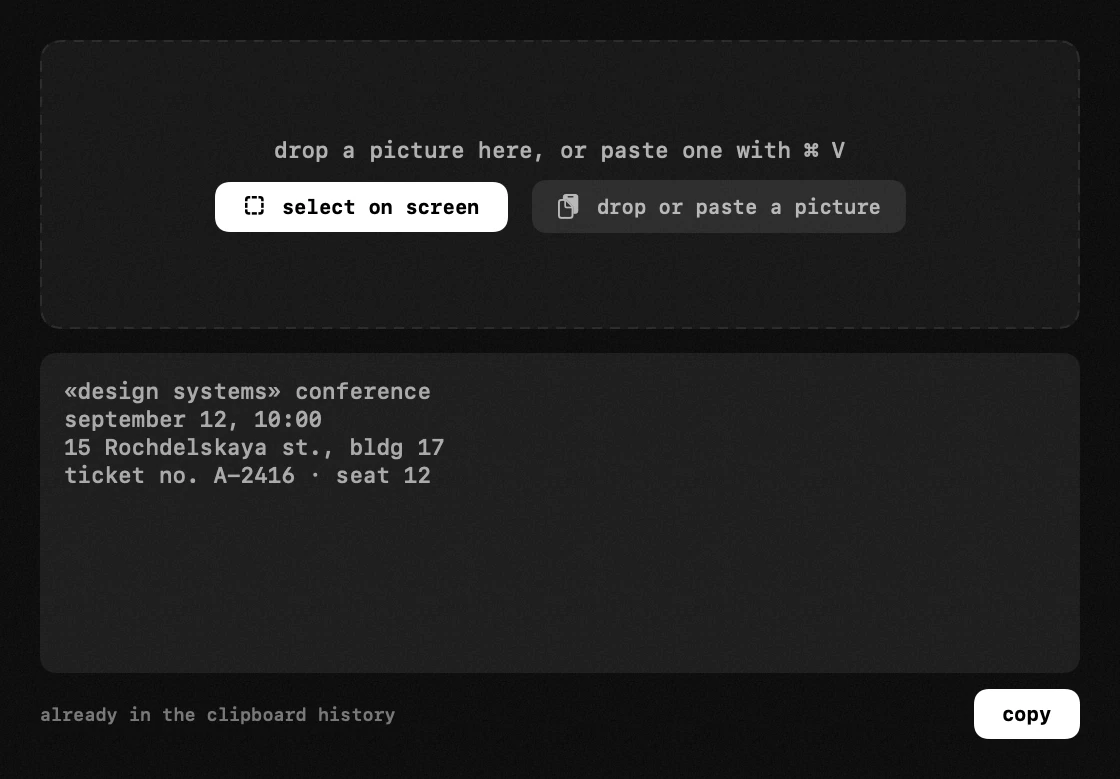
a frame around the piece of the screen you want — the same gesture as a screenshot — and the text comes back in a window rather than straight onto the clipboard. that window is the point: you read it, fix the character the font got wrong, and copy the whole thing or only the line you actually needed.
the hotkey, the languages it reads and where the result lands — the handbook end of this, in your own language: text recognition in the guide
or drop the image in
when the picture is already a file, framing the screen is a detour. drop it into the window from Finder, or paste one with ⌘V — the reading is the same, and so is the window you get it back in.
nothing is lost if you close that window too quickly: the reading is in the history with everything else you copied today. finding something you copied earlier
line breaks survive
most recognition returns one long ribbon of words. a table becomes soup, a code snippet becomes unusable, and you spend longer repairing the result than you would have spent retyping it.
hop keeps the line breaks it found. a table stays a table, a snippet stays a snippet, and an address stays on three lines instead of one. it is a small thing until the first time you paste a twelve-row table and do not have to touch it.
codes are read in the same pass
codes are read together with the text — there is no separate mode and no second app to switch to. a reading that turns out to hold a web address gets an «open link» button next to it. only web addresses: a scanned code is untrusted input, so a phone number, a Wi-Fi password or a contact card stays plain text and goes nowhere on its own.
reading a code off the screen is its own job, with its own reasons and its own traps — a qr code cannot be checked by eye before it is followed. how to scan a qr code on your Mac
the same engine, and you can reach it yourself
one thing about this module is not ours at all. the recognition is Apple's Vision, the framework Live Text sits on, and it is not hidden behind any app — a short Swift file reaches it from a terminal, with Command Line Tools and no Xcode.
we ran it while writing this, on macOS 26.6.2 with Xcode not installed. fifteen lines around VNRecognizeTextRequest read a test image and returned its three lines in order, breaks intact. the same call reports how many languages the engine accepts: thirty, with nothing downloaded.
the request is public api and has been since macOS 10.15, so nothing here is a workaround. VNRecognizeTextRequest — Apple Developer
so the module's value is not the recognition. the engine is on every Mac, free, and open to anyone willing to write that file and keep it somewhere. what a script has no answer for is where to point: it takes a file, and the whole problem was that the text is on the screen and not in one. hop is the aiming, not the reading.
nothing leaves your Mac
recognition runs locally, on that same Vision engine. no image is uploaded, no server sees your screen, and it works with the Wi-Fi off — which matters more than usual here, because what people frame is invoices, contracts and other people's slides.
hop has no accounts, no profiles and no telemetry. the only thing it ever sends is its own version number when it checks for an update.
framing a region needs permission to capture what is inside it, and macOS asks the first time. not every screen tool does: picking a colour goes through the system loupe, which hands back one pixel and needs nothing. the colour picker and why it asks for nothing
frequently asked questions
- can macOS already extract text from an image?
- yes — Live Text does it in Photos, Preview, Quick Look and Safari, and on a video paused in Apple's own players since Ventura. it stops where the pixels are drawn by something else: Chrome, Firefox, VLC, or an app window that is not a picture.
- how is this different from Live Text?
- Live Text works on things the system has recognised as pictures or as playing media. hop frames any rectangle of the screen, so what is underneath — a video in Chrome, a dialog, a screen share — stops mattering.
- does it work without an internet connection?
- yes. recognition happens on your Mac, on Apple's Vision engine. nothing is uploaded and nothing needs a connection.
- which languages does it recognise?
- the ones the system engine knows — the list comes from macOS, not from us. on macOS 26.6.2 it reported thirty, covering the major european and asian scripts, with nothing to download.
- can I use Apple's Vision from the Terminal instead?
- you can. a short Swift file built around VNRecognizeTextRequest runs with only Command Line Tools installed. it reads files, though — pointing it at a rectangle of the screen is the part you would have to build.
- is it really free?
- completely. no trial, no pro tier, nothing to unlock. hop is open source and the recognition module is open to everyone the same way.
- does it need screen recording permission?
- framing a region does, and macOS will ask the first time. nothing is recorded and nothing is stored — the frame is read and dropped. dropping a file into the window needs no permission at all.
other tools in hop
- qr code scannerread the code where it sits on screen — no reaching for your phone.
- keyboard lockwipe the keyboard clean without shutting the Mac down.
- vpn switcherevery vpn your Mac knows about, one switch each.
what people do with this
what people pay for this
| app | price | what you get instead |
|---|---|---|
| TextSniper | $7.99–11.99, one-time | the same text recognition, for nothing — and eighteen other tools with it. |
| TRex | free, open source | text off the screen, plus qr codes in the same pass. |
| hop | free, MIT | pull text off anything on screen — a video in Chrome or VLC, a locked pdf, another app's window. |
prices checked at the vendor's own page on 2 september 2026
about the author

Anton Shakirovmakes hop
makes hop and every page on this site. twenty tools under a single menu bar icon, MIT licensed and open source. reads and answers issues and email himself.